
Northbeam Metrics 101
Use this guide to understand our metrics
It's important to understand what our different metrics mean and how they may be different from the metrics you're used to seeing.
Finding Metrics in the Dashboard
To find the full list of our metrics within your dashboard:
- Navigate to the Attribution Page
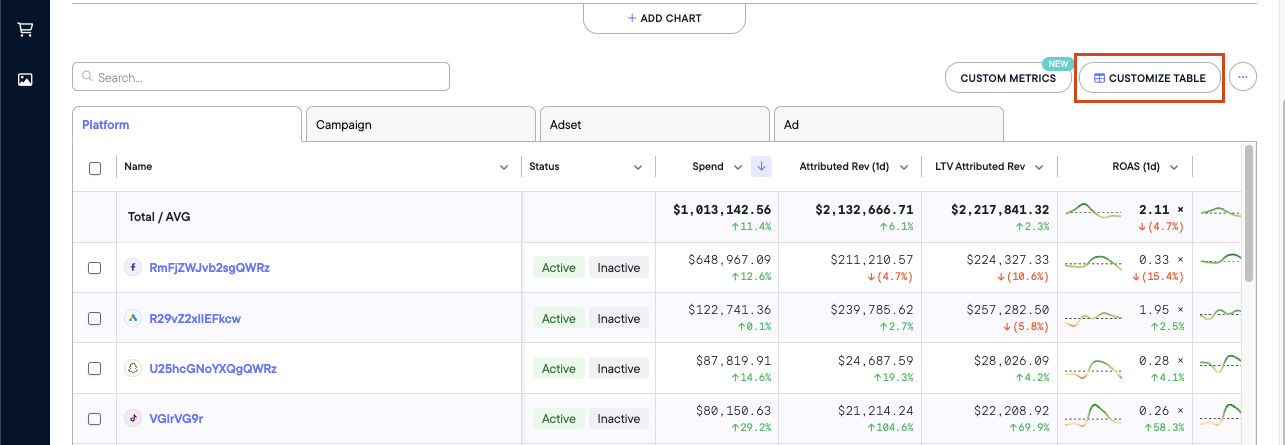
- Click Customize ⚙️
From here, you'll see a list of all the metrics we provide and you'll be able to add/remove any from your view:
Northbeam Conversion Metrics
Conversion metics are by far the most commonly used metrics within Northbeam.
Note: All conversion metrics in Accrual Accounting mode are reported in an Attribution Window, which is denoted in the metric name.
Examples:
- Transactions (1d) - Transactions completed in a 1-day window
- Attributed Rev (1d) - Revenue in a 1-day window
- ROAS (7d) - Return on Ad Spend calculated with Revenue in a 7-day window
Learn more about ourAttribution Windows here.
For simplicity, we have omitted the attribution windows from the list below.
| Metric Name | Definition | Calculation or Notes |
|---|---|---|
| Transactions | Number of Transactions from All Customers | |
| Transactions (New) | Number of Transactions from New Customers | |
| Transactions (Returning) | Number of Transactions from Returning Customers | |
| Attributed Rev | Attributed Revenue from All Customers | Revenue attributed to touchpoints in the given time period. Available in Accrual Accounting. |
| Attributed Rev (New) | Attributed Revenue from New Customers | Revenue attributed to touchpoints in the given time period. Available in Accrual Accounting. |
| Attributed Rev (Returning) | Attributed Revenue from Returning Customers | Revenue attributed to touchpoints in the given time period. Available in Accrual Accounting. |
| Rev | Revenue from All Customers | Only available in Cash Accounting. No attribution windows available. |
| Rev (New) | Revenue from New Customers | Only available in Cash Accounting. No attribution windows available. |
| Rev (Returning) | Revenue from Returning Customers | Only available in Cash Accounting. No attribution windows available. |
| AOV | Average Order Value from All Customers | Cash: Rev ÷ Transactions Accrual: Attributed Rev ÷ Transactions |
| AOV (New) | Average Order Value from New Customers | Cash: Rev (New) ÷ Transactions (New) Accrual: Attributed Rev (New) ÷ Transactions (New) |
| AOV (Returning) | Average Order Value from Returning Customers | Cash: Rev (Returning) ÷ Transactions (Returning) Accrual: Attributed Rev (Returning) ÷ Transactions (Returning) |
| Refunds | Returns, refunds, AND cancellations from All Customers | |
| Refunds (New) | Returns, refunds, AND cancellations from First Time Customers | |
| Refunds (Returning) | Returns, refunds, AND cancellations from Returning Customers | |
| Shipping | Shipping Costs from All Customers | |
| Shipping (New) | Shipping Costs from New Customers | |
| Shipping (Returning) | Shipping Costs from Returning Customers | |
| Tax | Taxes from All Customers | |
| Tax (New) | Taxes from New Customers | |
| Tax (Returning) | Taxes from Returning Customers | |
| Discounts | Discounts from All Customers | |
| Discounts (New) | Discounts from New Customers | |
| Discounts (Returning) | Discounts from Returning Customers | |
| CAC | All Customer Acquisition Cost | Spend ÷ Transactions |
| CAC (New) | New Customer Acquisition Cost | Spend ÷ Transactions (New) |
| CAC (Returning) | Returning Customer Acquisition Cost | Spend ÷ Transactions (Returning) |
| ROAS | Return on Ad Spend from All Customers | Attributed Rev ÷ Spend |
| ROAS (New) | Return on Ad Spend from New Customers | Attributed Rev (New) ÷ Spend |
| ROAS (Returning) | Return on Ad Spend From Returning Customers | Attributed Rev (Returning) ÷ Spend |
| MER | Media Efficiency Ratio from all Customers | Rev ÷ Spend |
| MER (New) | Media Efficiency Ratio from New Customers | Rev (New) ÷ Spend |
| MER (Returning) | Media Efficiency Ratio from Returning Customers | Rev (Returning) ÷ Spend |
| ECR | E-Commerce Conversion Rate from All Customers | Transactions ÷ Visits |
| ECR (New) | E-Commerce Conversion Rate from New Customers | Transactions (New) ÷ Visits |
| ECR (Returning) | E-Commerce Conversion Rate from Returning Customers | Transactions (Returning) ÷ Visits |
Northbeam Click Metrics
Below are Click-Based metrics. Keep in mind, we use Visits when calculating these formulas, not Clicks.
| Metric Name | Definition | Calculation or Notes |
|---|---|---|
| Visits | Visits to your website | Tracked via Northbeam Pixel. Visits are different from Clicks. Not all Clicks result in a Visit, so Visits are usually lower than in-platform Clicks. |
| New Visits | Visits to your website from new visitors | New Visitors are determined by the Northbeam Pixel and our device graph. |
| % New Visits | Percentage of first-time website visitors | (New Visits ÷ Visits) × 100 |
| CPM | Cost Per Mille, or Cost per 1000 Impressions | (Spend ÷ Impressions) × 1000 |
| CTR | Click-Thru Rate | Visits ÷ Impressions We use Visits in this formula, not Clicks. |
| eCPC | Cost per Visit | Spend ÷ Visits We use Visits in this formula, not Clicks. |
| eCPNV | Cost per New Visit | Spend ÷ New Visits |
In-Platform Metrics
All metrics below are pulled directly from each ad platform via API connection.
| Platform | What's Included | Attribution Model | Default Attribution Window |
|---|---|---|---|
| Spend | Ad spend across all platforms | -- | -- |
| Impressions | Number of times ads were served | -- | -- |
| Clicks, creative data, and conversion metrics reported by Facebook | Last-click | Attribution windows are labeled directly in each metric name | |
| TikTok | Clicks, creative data, and conversion metrics reported by TikTok | Last-click | Reflects the account's Attribution Manager settings. Default: 7-day click / 1-day view-through |
| Clicks, creative data, and conversion metrics reported by Google | Data-driven (default) or Last-click | Reflects the window configured per conversion action in the account. Default: 30-day click / 1-day view-through | |
| AppLovin | Clicks, creative data, and conversion metrics reported by Applovin | Last-click | Attribution windows are labeled directly in each metric name |
| Snapchat | Clicks, creative data, and conversion metrics reported by Snapchat | Last-click | Reflects the account's Optimization Window setting. Default: 28-day swipe / 1-day view-through |
| Clicks, creative data, and conversion metrics reported by Pinterest | Last-click | 30-day click / 30-day view-through | |
| Twitter (X) | Clicks, creative data, and conversion metrics reported by Twitter | Last-click | Reflects the window configured per conversion event in the account. Default: 30-day post-engagement / 1-day post-view |
| MNTN | Clicks, creative data, and conversion metrics reported by MNTN | Last-click | Reflects the account's Verified Visit window settings. Default: 7-day visit window (Retargeting) / 14-day visit window (Prospecting) + fixed 30-day conversion window) |
Updated 3 months ago