

Finding Metrics in the Dashboard
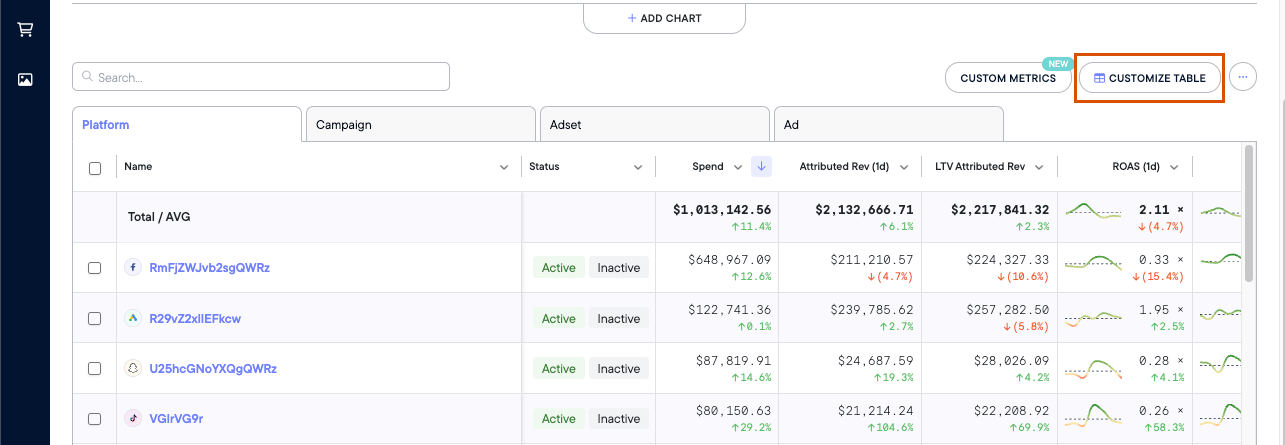
To find the full list of our metrics within your dashboard:- Navigate to the Attribution Page
- Click Customize ⚙️
Northbeam Conversion Metrics
Conversion metics are by far the most commonly used metrics within Northbeam. Note: All conversion metrics in Accrual Accounting mode are reported in an Attribution Window, which is denoted in the metric name. Examples:- Transactions (1d) - Transactions completed in a 1-day window
- Attributed Rev (1d) - Revenue in a 1-day window
- ROAS (7d) - Return on Ad Spend calculated with Revenue in a 7-day window
| Metric Name | Definition | Calculation or Notes |
|---|---|---|
| Transactions | Number of Transactions from All Customers | |
| Transactions (New) | Number of Transactions from New Customers | |
| Transactions (Returning) | Number of Transactions from Returning Customers | |
| Attributed Rev | Attributed Revenue from All Customers | Revenue attributed to touchpoints in the given time period. Available in Accrual Accounting. |
| Attributed Rev (New) | Attributed Revenue from New Customers | Revenue attributed to touchpoints in the given time period. Available in Accrual Accounting. |
| Attributed Rev (Returning) | Attributed Revenue from Returning Customers | Revenue attributed to touchpoints in the given time period. Available in Accrual Accounting. |
| Rev | Revenue from All Customers | Only available in Cash Accounting. No attribution windows available. |
| Rev (New) | Revenue from New Customers | Only available in Cash Accounting. No attribution windows available. |
| Rev (Returning) | Revenue from Returning Customers | Only available in Cash Accounting. No attribution windows available. |
| AOV | Average Order Value from All Customers | Cash: Rev ÷ TransactionsAccrual: Attributed Rev ÷ Transactions |
| AOV (New) | Average Order Value from New Customers | Cash: Rev (New) ÷ Transactions (New)Accrual: Attributed Rev (New) ÷ Transactions (New) |
| AOV (Returning) | Average Order Value from Returning Customers | Cash: Rev (Returning) ÷ Transactions (Returning)Accrual: Attributed Rev (Returning) ÷ Transactions (Returning) |
| Refunds | Returns, refunds, AND cancellations from All Customers | |
| Refunds (New) | Returns, refunds, AND cancellations from First Time Customers | |
| Refunds (Returning) | Returns, refunds, AND cancellations from Returning Customers | |
| Shipping | Shipping Costs from All Customers | |
| Shipping (New) | Shipping Costs from New Customers | |
| Shipping (Returning) | Shipping Costs from Returning Customers | |
| Tax | Taxes from All Customers | |
| Tax (New) | Taxes from New Customers | |
| Tax (Returning) | Taxes from Returning Customers | |
| Discounts | Discounts from All Customers | |
| Discounts (New) | Discounts from New Customers | |
| Discounts (Returning) | Discounts from Returning Customers | |
| CAC | All Customer Acquisition Cost | Spend ÷ Transactions |
| CAC (New) | New Customer Acquisition Cost | Spend ÷ Transactions (New) |
| CAC (Returning) | Returning Customer Acquisition Cost | Spend ÷ Transactions (Returning) |
| ROAS | Return on Ad Spend from All Customers | Attributed Rev ÷ Spend |
| ROAS (New) | Return on Ad Spend from New Customers | Attributed Rev (New) ÷ Spend |
| ROAS (Returning) | Return on Ad Spend From Returning Customers | Attributed Rev (Returning) ÷ Spend |
| MER | Media Efficiency Ratio from all Customers | Rev ÷ Spend |
| MER (New) | Media Efficiency Ratio from New Customers | Rev (New) ÷ Spend |
| MER (Returning) | Media Efficiency Ratio from Returning Customers | Rev (Returning) ÷ Spend |
| ECR | E-Commerce Conversion Rate from All Customers | Transactions ÷ Visits |
| ECR (New) | E-Commerce Conversion Rate from New Customers | Transactions (New) ÷ Visits |
| ECR (Returning) | E-Commerce Conversion Rate from Returning Customers | Transactions (Returning) ÷ Visits |
Northbeam Click Metrics
Below are Click-Based metrics. Keep in mind, we use Visits when calculating these formulas, not Clicks.| Metric Name | Definition | Calculation or Notes |
|---|---|---|
| Visits | Visits to your website | Tracked via Northbeam Pixel.Visits are different from Clicks. Not all Clicks result in a Visit, so Visits are usually lower than in-platform Clicks. |
| New Visits | Visits to your website from new visitors | New Visitors are determined by the Northbeam Pixel and our device graph. |
| % New Visits | Percentage of first-time website visitors | (New Visits ÷ Visits) × 100 |
| CPM | Cost Per Mille, or Cost per 1000 Impressions | (Spend ÷ Impressions) × 1000 |
| CTR | Click-Thru Rate | Visits ÷ ImpressionsWe use Visits in this formula, not Clicks. |
| eCPC | Cost per Visit | Spend ÷ VisitsWe use Visits in this formula, not Clicks. |
| eCPNV | Cost per New Visit | Spend ÷ New Visits |
In-Platform Metrics
All metrics below are pulled directly from each ad platform via API connection.| Platform | What’s Included | Attribution Model | Default Attribution Window |
|---|---|---|---|
| Spend | Ad spend across all platforms | — | — |
| Impressions | Number of times ads were served | — | — |
| Clicks, creative data, and conversion metrics reported by Facebook | Last-click | Attribution windows are labeled directly in each metric name | |
| TikTok | Clicks, creative data, and conversion metrics reported by TikTok | Last-click | Reflects the account’s Attribution Manager settings.Default: 7-day click / 1-day view-through |
| Clicks, creative data, and conversion metrics reported by Google | Data-driven (default) or Last-click | Reflects the window configured per conversion action in the account.Default: 30-day click / 1-day view-through | |
| AppLovin | Clicks, creative data, and conversion metrics reported by Applovin | Last-click | Attribution windows are labeled directly in each metric name |
| Snapchat | Clicks, creative data, and conversion metrics reported by Snapchat | Last-click | Reflects the account’s Optimization Window setting.Default: 28-day swipe / 1-day view-through |
| Clicks, creative data, and conversion metrics reported by Pinterest | Last-click | 30-day click / 30-day view-through | |
| Twitter (X) | Clicks, creative data, and conversion metrics reported by Twitter | Last-click | Reflects the window configured per conversion event in the account.Default: 30-day post-engagement / 1-day post-view |
| MNTN | Clicks, creative data, and conversion metrics reported by MNTN | Last-click | Reflects the account’s Verified Visit window settings.Default: 7-day visit window (Retargeting) / 14-day visit window (Prospecting) + fixed 30-day conversion window) |