
🏍️ Northbeam Apex
Optimize your Meta ads against first-party Northbeam data with this new integration.

What is Northbeam Apex?
Northbeam Apex is a direct integration between Northbeam and our advertising platform partners to optimize ad performance using Northbeam data.
With Apex, participating platform partners (including Meta, Pinterest, and Axon) can integrate Northbeam's first-party, multi-touch performance signals into their algorithm’s optimization process. This means you can optimize your ad delivery against the Northbeam order-level data you already trust.
With a more informed end-to-end signal that includes orders and the touchpoints leading to purchase, the platform's algorithm can better understand how your ads affect the entire customer journey and optimize more effectively than ever before.
How does Apex work?
With Apex, our partners can integrate first-party, multi-touch performance signals into their algorithm’s ad optimization process. For the partner, this means you can optimize ad delivery for your advertisers using the Northbeam MTA data they use and trust.
Let's use Meta as an example. Under the hood, Meta optimizes ads based on all information it gets from user interactions, including information captured by the Meta pixel. This information can include:
- User demographics / interests
- Interaction with ads
- Clicks / navigation to landing pages
- Custom actions taken on those pages (such as email signups, sales transactions, etc.)
The more information Meta has about the user, the better it can optimize ad delivery and the better your ad will perform.
With Apex, Meta has access to Northbeam's proprietary Multi-Touch Attribution models (MTA), which provide extra information about your orders and all the touchpoints leading up to them. Northbeam's data enables Meta to have a more holistic view of the impact your ads have on orders, allowing it to refine its algorithm based on YOUR specific results.
How to enable Northbeam Apex
Please follow the instructions below to activate.
Step 1: Open Apex settings
While logged into Northbeam as your account's admin user, click the "Settings" button represented by a gear in the bottom left hand corner of the screen. Under "Account settings," click on "Apex."
Step 2: Select platforms
Select the platforms you'd like to enable.
Step 3: Define your North Star metric
In Settings → Apex, select:
- Revenue type (First-Time, Returning, or Blended)
- Attribution model
- Attribution window
- Accounting mode (Cash or Accrual)
This defines what Apex tells Meta to optimize toward.
Note: Apex does not edit or change ads in Ads Manager. It simply passes performance signals for Meta to interpret and use when ready.Turning on Apex will also not impact performance at this stage. Currently, optimization using Apex data is in beta and limited to select customers.
FAQs
What platforms is Apex available for?
- Meta, Snap, and Axon by AppLovin
What happens when I turn on Apex in my account?
- When you flip the toggle, Northbeam starts sending order-level performance signals — built from your attribution model and your North Star metric — to your selected ad platform. Those signals are used to train the platform's algorithm to optimize toward the outcomes you actually care about.
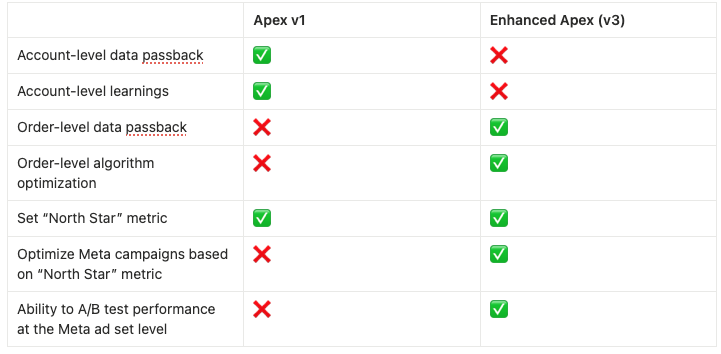
What is Enhanced Apex, and how is it different from the previous version?
- Enhanced Apex improves how Northbeam sends performance data back to Meta. It helps Meta better model ad performance, while giving advertisers more accurate revenue attribution and optimization potential.
- This update introduces:
- A new connection flow through Meta Business Manager (CAPI)
- More granular event tracking
- A foundation for future Meta-side optimization tests (known as "Custom Attribution" in Meta)
Will this impact my current CAPI connection or attribution?
- No, this setup is additive. It only enables richer data to Meta.
Will this affect ad performance immediately?
- Not yet. Ad optimization (known as "Custom Attribution" in Meta) will begin rolling out in Q2 2026.
What is Meta Custom Attribution?
- Custom Attribution is an attribution model that optimizes for outcomes as measured in your external analytics tool. With Custom Attribution, you can share click-level attribution in sights with Meta — such as how much credit is attributed to Meta for each purchase. This enable Meta’s ad delivery to optimize for the outcomes that matter most to your business based on your own attribution logic, not platform defaults.
When will Custom Attribution be available to me?
- Custom Attribution is currently in beta, and will roll out more broadly beginning Q2 2026.
Is this data passed as standard CAPI events?
- No, Apex sends custom CAPI events requested by Meta for improved signal quality.
Will other platforms be added to Apex?
- Yes, we are working to build integrations with other ad platforms.
Please reach out to your Media Strategist, Customer Success Manager, or contact Support if you have any questions.
Updated 5 days ago