
Tracking for Vibe
This guide will show you how to connect your Vibe account to Northbeam and pull the following metrics:
- Spend
- Impressions for CDV matching
Supported Attribution Models
The Vibe integration currently supports the following Northbeam attribution models:
- First Touch
- Last Touch
- Last Non-Direct Touch
- Clicks-Only
- Clicks + Deterministic Views (C+DV)
Step 1: Enter Your API Key
To connect your Vibe account:
- Log in to your Vibe account.
- Generate yourAPI Key: https://help.vibe.co/en/articles/8943325-vibe-api-reporting
- In Northbeam, go to Settings → Connections → Vibe.
- Paste your API key and click Connect.
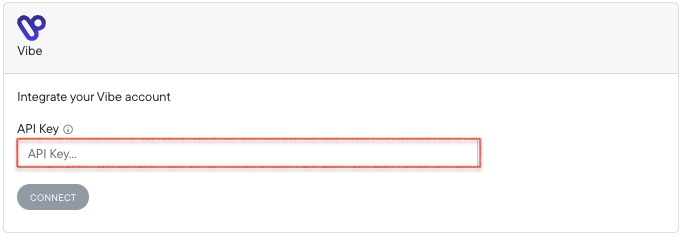
Settings > Connections > Vibe > API Key
Prerequisites for CDV
- The Vibe API key must be linked to an account with an active Vibe campaign. You cannot enable the integration until a campaign is live.
- To verify readiness, ping the Vibe API endpoint (
/get_advertiser_ids). It will return an advertiser ID only after campaign activation (usually within 30 minutes of launch).
Step 2: Enable Clicks + Deterministic Views (C+DV)
Once your Vibe connection is active in Northbeam:
- Go to Settings → Model Settings → Attribution Models.
- Select Clicks + Deterministic Views (C+DV) from the list of attribution models.
- Under Available Platforms, check the box for Vibe.
- Click Save Changes.
- Allow up to 48 hours for Vibe impression data to populate in your dashboard.
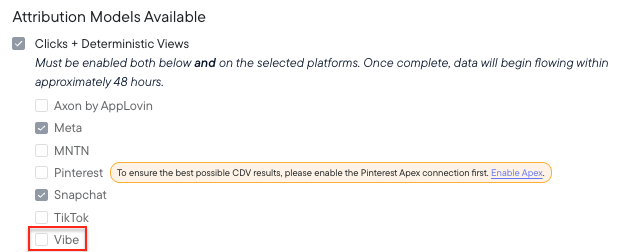
Settings > Model Settings > Attribution Models Available
Updated about 12 hours ago