

Overview
Configure Apex in Northbeam
Connect Northbeam in Snap Events Manager
Confirm account eligibility
Create the campaign
What changes
- A new campaign-level attribution setting tells Snap to optimize toward third-party partner outcomes.
- Targeting, budgets, placements, and creative otherwise follow your normal web campaign workflow.
- Northbeam remains your measurement source of truth. Snap and Northbeam reporting won’t match one for one.
How 3PO compares to standard purchase optimization
What 3PO doesn’t change
- You don’t need to change your Northbeam attribution settings to fit Snap.
- 3PO doesn’t guarantee reporting parity between platforms.
- A completed Apex connection supports signal readiness, but doesn’t by itself guarantee campaign eligibility.
- 3PO currently supports web conversion campaigns only, not app campaigns.
Before you start: readiness and eligibility
Snap Ads Manager unlocks third-party optimization automatically when your ad account meets the required checks. Review these before you begin so you can resolve common blockers early.Step 1: Configure Apex in Northbeam
Complete this step in your Northbeam account. Keep your existing measurement approach intact; the goal is to share your Northbeam outcome definition with Snap.Open Settings
Open Apex
Confirm your North Star metric
Enable Snapchat
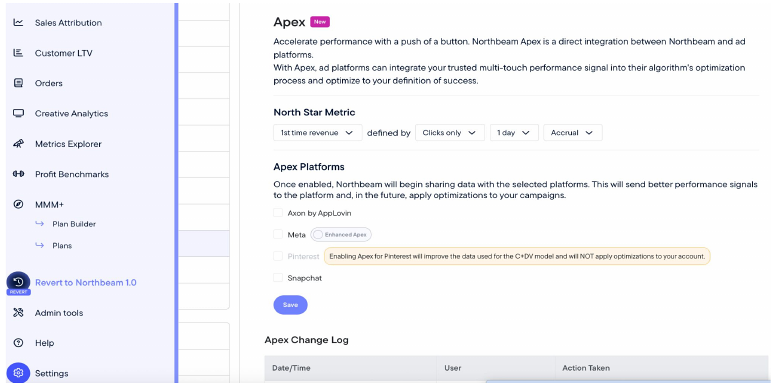
Apex settings in Northbeam. Exact controls may vary.
- Verify the Snap ad account you intend to use is available to connect.
- Note your North Star metric and attribution configuration for reference.
- Confirm whoever completes the next step has access to your Snap Events Manager.
Step 2: Connect Northbeam in Snap Events Manager
Open Events Manager
Open Partner Integrations
Select Northbeam
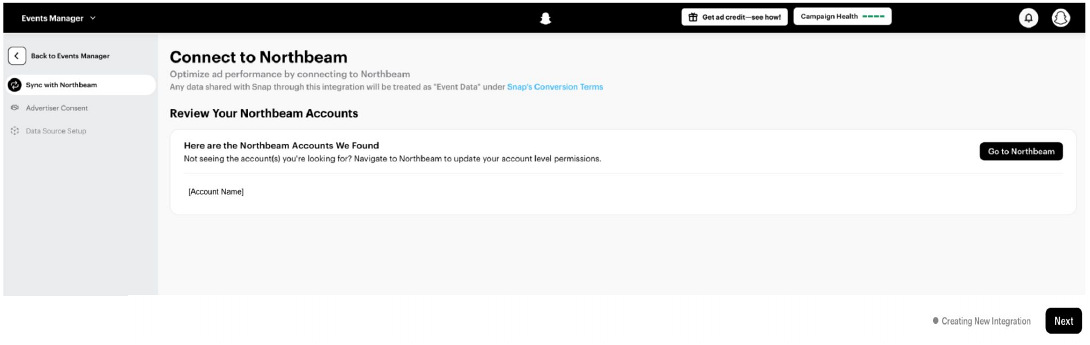
Complete the guided flow
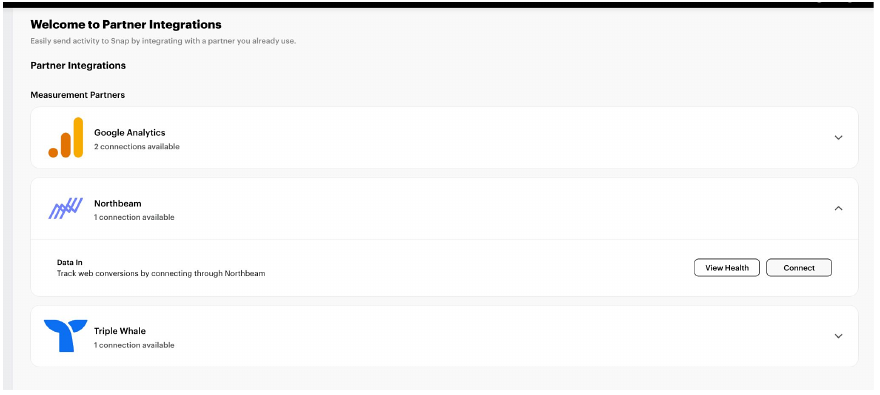
Northbeam appears under Measurement Partners in Partner Integrations.
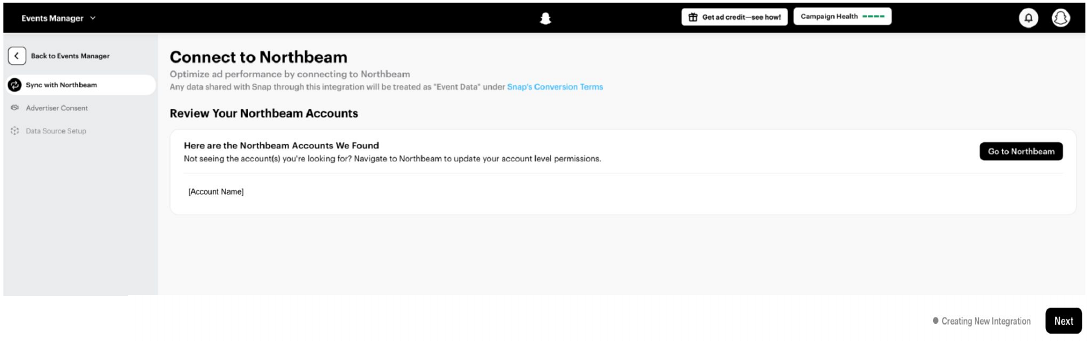
Review the matched Northbeam account, then continue until the flow confirms completion.
Step 3: Create a 3PO campaign
Create the campaign through Snap’s standard Sales workflow. The main change is the campaign attribution method.Choose Sales
Choose the attribution method
Confirm the Pixel
Build the campaign
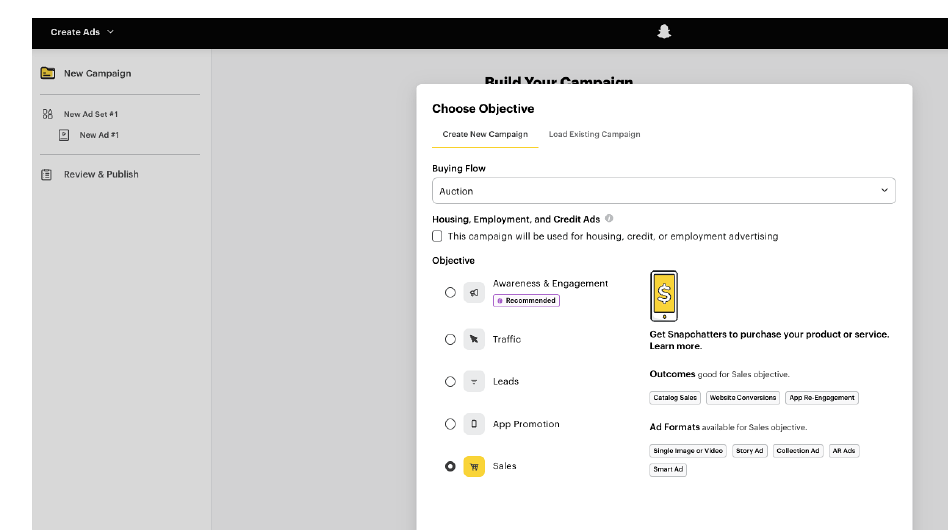
Select the Sales objective.
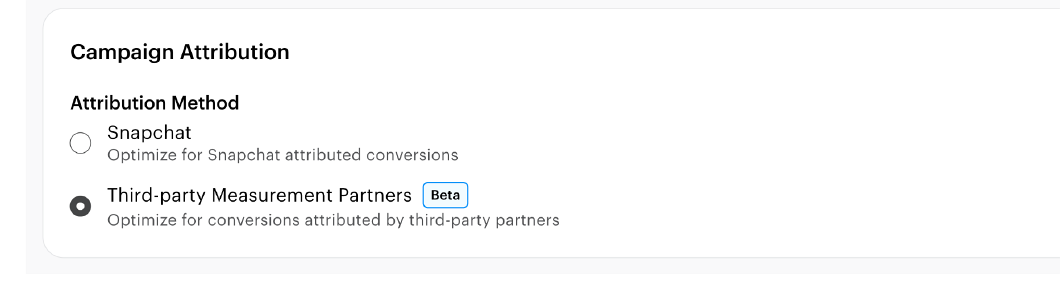
Select Third-party Measurement Partners.
What stays business as usual
- No targeting restrictions apply beyond your normal Snap policy and eligibility requirements.
- Budgets should support enough conversion volume for the model to learn.
- Single image, video, and collection ad formats follow your normal web campaign plan.
- The campaign must use a webview attachment. App optimization is outside the current 3PO scope.
Step 4: Choose auto-bid or target cost
Eligible accounts can use either bid strategy. Choose the one that matches your operating model and the stability of your Northbeam-measured CPA.- Use a representative Northbeam CPA as your baseline.
- Set a realistic starting target that reflects Northbeam-attributed purchase volume.
- Avoid frequent bid changes during the initial learning period.
- Work with your Snap sales representative for account-specific calibration.
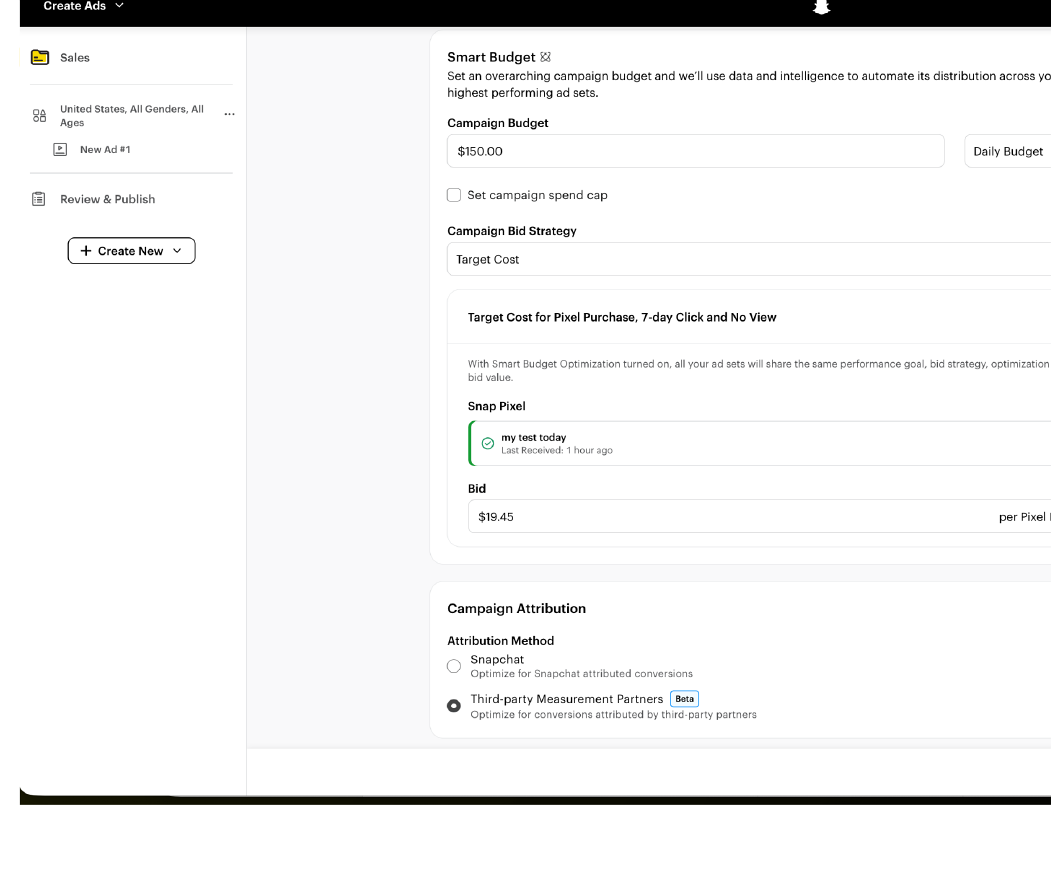
Example target cost setup with Third-party Measurement Partners attribution selected.
Reading performance in Northbeam and Snap
Use Northbeam for source-of-truth evaluation, and Snap’s modeled partner metrics for in-platform pacing and bid decisions. Differences between the two are expected because their methodologies and update timing differ.Modeled partner metrics in Snap Ads Manager
Recommended operating rhythm
Set expectations before launch
- 3PO aims for closer optimization alignment, not identical reporting.
- Partner data may update later than Snap’s in-platform modeled metrics.
- Account setup, signal quality, bids, conversion volume, and auction conditions all affect results.
- An early reporting gap doesn’t mean the integration is broken.
Testing 3PO against standard optimization
Snap’s self-serve Split Test tool doesn’t currently support a direct comparison between standard first-party optimization and third-party partner optimization. If you want a controlled read, contact your Snap sales representative, who can engage Snap’s Marketing Science team. How it works:- You request a controlled first-party vs. 3PO comparison.
- Snap Sales confirms eligibility and testing goals.
- Snap Marketing Science designs a multi-cell split test.
- You review Northbeam and Snap results together.
- The number of cells depends on expected conversion volume, budget, and statistical power.
- Cells should use comparable audiences, dates, creative, placements, and budgets unless the design specifies otherwise.
- Define Northbeam-measured CPA and ROAS (and any new-customer metric) as primary or secondary outcomes before launch.
- Running two campaigns side by side isn’t a substitute for randomized measurement; audience and auction differences can bias the comparison.
Launch checklist
Troubleshooting
My Northbeam account doesn't appear in Snap
My Northbeam account doesn't appear in Snap
The Third-party Measurement Partners option is locked or missing
The Third-party Measurement Partners option is locked or missing
- Confirm the ad account and Pixel are the same ones connected through Northbeam Apex.
- Review Purchase event passback and signal readiness in Events Manager.
- Check your recent Northbeam-attributed purchase volume.
- Ask your Snap sales representative to confirm eligibility or the current blocker.
Delivery is limited
Delivery is limited
Snap and Northbeam numbers don't match
Snap and Northbeam numbers don't match
I need a causal performance read
I need a causal performance read
FAQ
Is the Apex integration the same as 3PO?
Is the Apex integration the same as 3PO?
Do I need to change my Northbeam attribution model?
Do I need to change my Northbeam attribution model?
Which bid strategies are supported?
Which bid strategies are supported?
Should my target cost equal my old Snap Pixel CPA?
Should my target cost equal my old Snap Pixel CPA?
Will Snap and Northbeam report the same purchases and ROAS?
Will Snap and Northbeam report the same purchases and ROAS?
Can I compare first-party and 3PO in Snap's self-serve Split Test tool?
Can I compare first-party and 3PO in Snap's self-serve Split Test tool?
What if my account isn't eligible?
What if my account isn't eligible?
Are app campaigns supported?
Are app campaigns supported?