

General Guidelines
For an upcoming Apex test, we’ve seen the most success when customers run some variation of this setup:- Create an A/B test in Meta Experiments with two separate campaigns:
- Apex campaign: optimize using Custom Attribution.
- BAU campaign: continue optimizing using Meta’s native attribution.
- Note: I’d recommend a fresh duplicate of your BAU campaign to compare apples to apples.
- Keep the campaigns as identical as possible (audience, budget, creative, etc.). As long as the key variable you’re testing is the attribution setting, you’re set up for success.
- Meta recommends running the test for at least two weeks to allow for the algorithm to reconfigure itself. Because your Meta account has never optimized to this attribution model before, we typically see slower performance at the start as a result.
- Use Northbeam as the source of truth, with GA as a secondary reference, and monitor CPM, CPC, and conversion rate for tradeoffs.
- Apex campaigns will typically see increased CPM, CPC’s, etc. with increased CVR to make up the difference in media cost.
- This is a watchout for you on GA4 as well, traffic will likely dip for the Apex campaign but CVR should see an increase.
- Apex campaigns will typically see increased CPM, CPC’s, etc. with increased CVR to make up the difference in media cost.
Step 1: Build campaign for testing
Build out the two ad sets outlined below: Navigate to Ads Manager table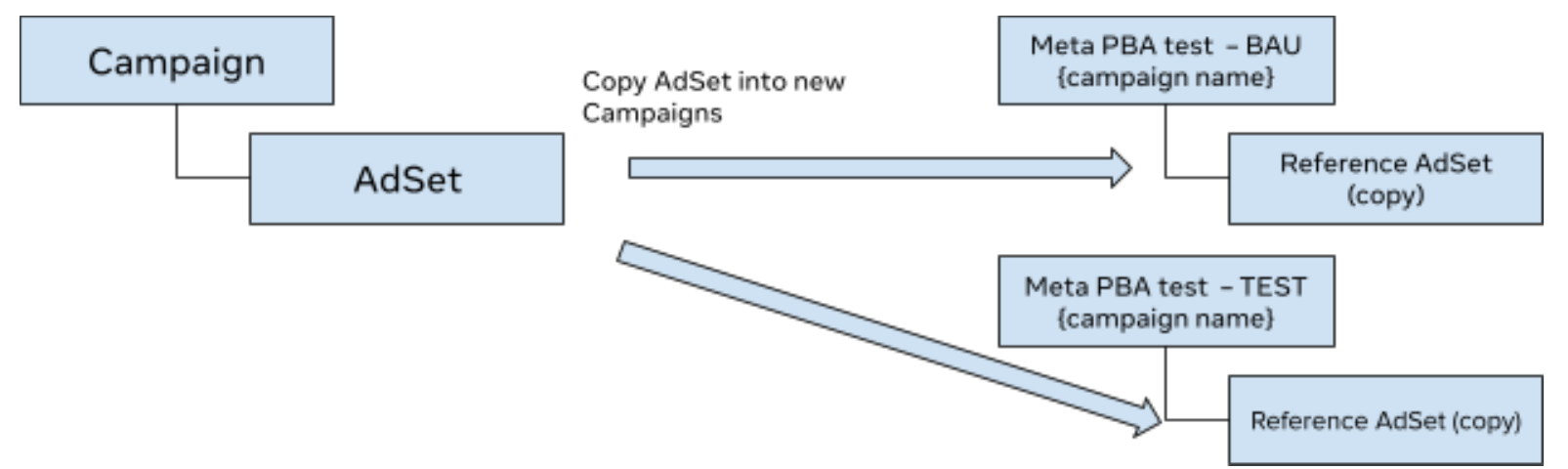
- Control - Create a new Sales objective campaign and, within the new campaign, create a duplicate L2 (ad set) from the reference L2 (ad set). Name this “Meta PBA test – BAU {campaign name}”.
- Test - Repeat step 1 and name this “Meta PBA test – TEST {campaign name}”
- Campaign and ad set need to satisfy the following eligibility criteria (for both Test and Control)
- Select Sales as your campaign objective, then click Continue.
- At the campaign level, select Campaign budget as your budget strategy, and Highest volume or Highest value as your Campaign bid strategy.
- Create and edit an ad set to configure these conversion settings:
- Conversion location: Select Website or Website + App.
- Performance goal: Select Maximize number of conversions or Maximize value of conversions
- Dataset: Select an eligible dataset
- Conversion event: Select Purchase
- Attribution model:
- Select Custom for Test
- Select Standard for BAU
- Select the custom attribution source:
- If using Web only, custom attribution source will be auto-populated.
- If using both Web and App datasets, select the custom attribution source for each.
- Save and stop for QA
| Website and App Conversion Settings | |
|---|---|
| Select Website and app conversion location |  |
| Select either Maximize number of conversions or Maximize value of conversions as a performance goal |  |
| Select a Conversion event |  |
| Select Custom attribution as your Attribution model |  |
| Select a Custom attribution source Note: If your Web and App datasets are different, select both custom attribution sources |  |
| Website Conversion Settings | |
|---|---|
| Select Website conversion location |  |
| Select either Maximize number of conversions or Maximize value of conversions as a performance goal | |
| Select an eligible dataset with the green Custom attribution label |  |
| Select the Purchase conversion event Currently, this is the only event supported |  |
| Select Custom attribution as your Attribution model | |
| Select a Custom attribution source |  |
| App Conversion card settings | |
|---|---|
| Select App conversion location |  |
| Select Maximize number of app events as a performance goal |  |
| Select a Mobile app store |  |
| Select an App |  |
| Select the Purchase app event Currently, this is the only event supported |  |
| Select Custom attribution as your Attribution model | |
| Select a Custom attribution source | |
Step 2: A/B Test Setup
Set up a split test using the Experiments tool.-
Advertiser is responsible for setting up the A/B test in Experiments by clicking ‘Create an A/B test’

-
Add campaigns to test and control cells:

- Campaign A (Test): Name: “Meta PBA test – TEST {campaign name}”
- Campaign B (BAU): Name: “Meta PBA test – BAU {campaign name}”
- For more complex designs (e.g., 3-cell), add additional cells and campaigns as needed
-
Set the schedule
- Start date: one day BEFORE the campaign start date
- End date: one day AFTER the campaign end date
-
DISABLE ‘End test early if a winner is found’ to preserve statistical validity

-
Test Name
- Name your study clearly (e.g., Custom Attribution vs BAU - Q3 2026)
-
Determining the winner:
- Select ‘Cost per purchase’ as the key metric for winner declaration
- Advertisers may add metrics for additional business-specific KPIs
- Advertisers should use their own Source of Truth to determine campaign winner
Step 3: Launch
Things to monitor during the test flight
Continue to monitor the following key metrics and reach out to Meta with any questions:- Ensure CAPI integration & campaign quality for changes in Events Manager/Ads manager
- Ensure your match key coverage remains consistent before and during the test