

Meta Shops FAQ
1. How do you track and attribute Meta Shops conversions?
Northbeam identifies individual Meta Shops purchases and fractionalizes purchase credit to all touchpoints in the customer journey that led to that purchase. The major advantage of using Northbeam for Meta Shops attribution is that, unlike Meta, we can link Meta Shops purchases to even non-Meta campaign touchpoints; this way, customers get a true sense of how all paid touchpoints (including non-Meta campaigns) are driving Meta Shops purchase activity.NoteThe Northbeam Pixel doesn’t fire on Meta Shops storefronts, so we don’t track Visits. Consequently, the Visits count won’t be recorded, and CPCs (Cost Per Clicks) may appear inflated for any Campaigns, Ad Sets, or Ads leading to Meta Shops.
2. How can I view Meta Shops performance?
Meta Shops purchase credit is seamlessly factored into your Attributed Revenue and Transactions metric columns. To see the revenue or transaction breakout across Web and Shops orders:- Hover over any cell in the Attributed Rev or Transactions columns:
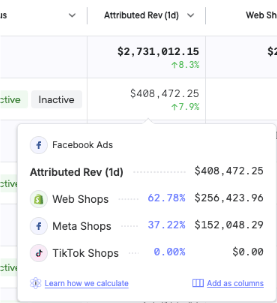
Meta Shops (and TikTok Shops) are factored into Attributed Rev
- Click Add as columns to automatically insert new, sortable metric columns into the Sales Table that display the breakout between Web and Shops orders.

3. How can I view Meta Shops organic performance?
Sometimes customers visit your Shops platform to make direct purchases without having clicked on an ad - we refer to these as Organic purchases. Northbeam uses a combination of statistics, platform data, and your ad’s performance to produce an estimate of Organic purchases made on your Shops storefront. You can see Organic Shops data using the Meta Shops (Organic) Platform label.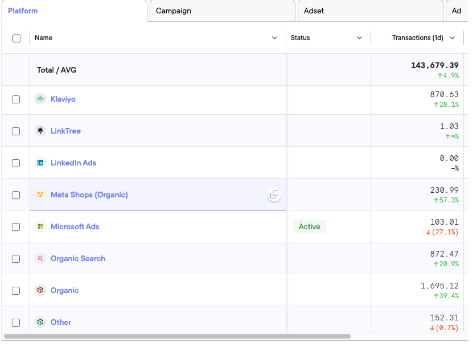
Meta Shops (Organic) in the Platform breakdown
4. Can I see platform-reported Meta Shops metrics?
Yes, you can! On the Sales page, under Customize Table, find the following metrics under Facebook Reported:- FB Meta Shop Purchases (1D Click)
- FB Meta Shop Purchases (1D View)
- FB Meta Shop Purchases (7D Click)
- FB Meta Shop Purchases (7D Click, 1D View)
- FB Meta Shop Purchase Conversion Value (1D Click)
- FB Meta Shop Purchase Conversion Value (1D View)
- FB Meta Shop Purchase Conversion Value (7D Click)
- FB Meta Shop Purchase Conversion Value (7D Click, 1D View)
TikTok Shops FAQ
1. How do you track and attribute TikTok Shops conversions?
Northbeam identifies each individual TikTok Shops purchase and fractionalizes purchase credit across all your TikTok campaigns.Note:The Northbeam Pixel doesn’t fire on TikTok Shops storefronts, so we don’t track Visits. Consequently, the Visits count won’t be recorded, and CPCs (Cost Per Clicks) may appear inflated for any Campaigns, Ad Sets, or Ads leading to TikTok Shops.
2. How can I view TikTok Shops ad performance?
TikTok Shops purchase credit is seamlessly factored into your Attributed Revenue and Transactions metric columns. To see the revenue or transaction breakout across Web and Shops orders:- Hover over any cell in the Attributed Rev or Transactions columns:
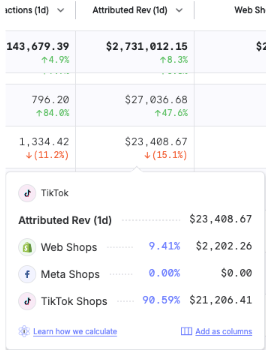
TikTok Shops (and Meta Shops) are factored into Attributed Rev
- Click Add as columns to automatically insert new, sortable metric columns into the Sales Table that display the breakout between Web and Shops orders.

3. How can I view TikTok Shops organic performance?
Sometimes customers visit your Shops platform to make direct purchases without having clicked on an ad - we refer to these as Organic purchases. Northbeam uses a combination of statistics, platform data, and your ad’s performance to produce an estimate of Organic purchases made on your Shops storefront. You can see Organic Shops data using the TikTok Shops (Organic) Platform label.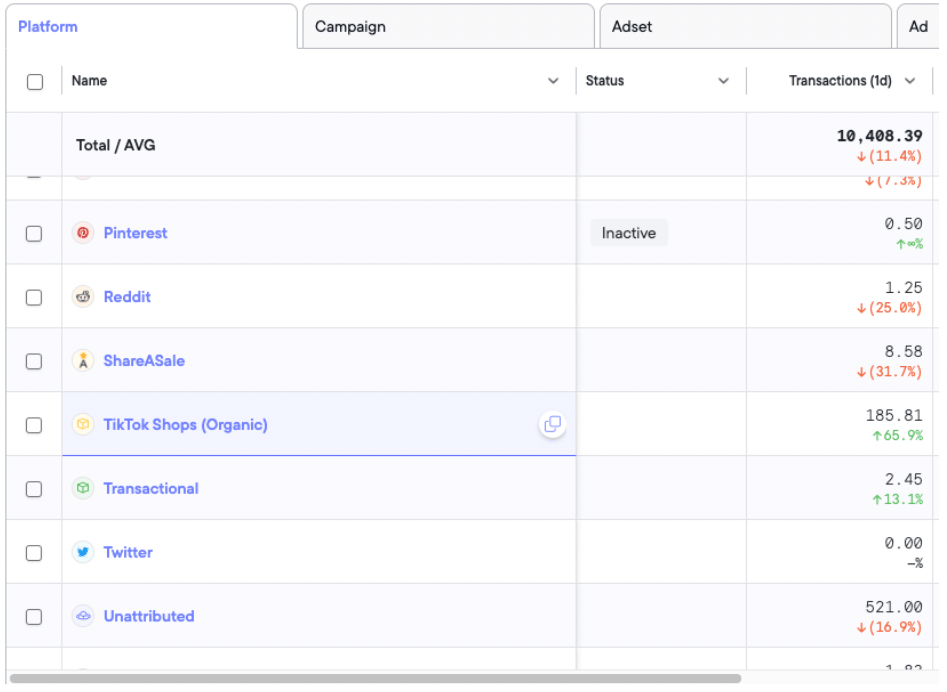
TikTok Shops (Organic) in the Platform breakdown