

Meta Ads FAQ
1. How do I connect an extra account or remove an account?
Follow the walkthrough below:2. Will my Meta Ads be reset to the learning phase?
Editing URL parameters on an active Meta Ad may affect its delivery or require Meta to process the change. Our recommendation:- Before changing existing ads, check whether they already use a supported Triple Whale, Hyros, Rockerbox, or Wicked Reports setup.
- If you need to update your ads, consider making the changes together so your tracking stays consistent.
- If you want to reduce disruption, make the change during a lower-traffic period or as part of your next creative refresh.
- Ads without supported tracking parameters may not receive full visit and conversion attribution in Northbeam.
3. Can Northbeam ingest UTMs from other tracking platforms?
Yes. Northbeam supports specific Meta tracking parameter structures from:- Triple Whale
- Hyros
- Rockerbox
- Wicked Reports
nbt and nb_placement).
The parameter names and values must match the supported formats exactly.
See Using Supported Parameters From Another Attribution Platform for the supported formats.
4. Can you track conversions from Meta Shops?
For Shopify
Yes. Northbeam can identify completed Meta Shop orders using Shopify order data. Make sure your store is connected to Facebook and Instagram by Meta in Shopify. No additional Northbeam order tagging is required for the standard Shopify setup.For All Other Platforms
Northbeam needs a way to identify which orders came from Meta Shops. Step 1: Add a unique Order Tag using theorder_tags field in the Orders API, then send the applicable orders to Northbeam.
Step 2: Notify our team and provide the name of the tag used for Meta Shop orders.
Step 3: Our team will confirm when the setup is complete.
5. How can I see Meta Shops credit?
Meta Shop conversion credit is included in Attributed Revenue and Transactions based on the Northbeam attribution model you are viewing. This includes models such as Clicks Only and Clicks + Modeled Views.Note:The Northbeam Pixel does not fire inside Meta Shops.Because of this, Northbeam does not record a standard website Visit for an order completed entirely inside Meta Shops.Visit-based metrics such as CPC can therefore appear inflated for Campaigns, Ad Sets, or Ads that send traffic to Meta Shops.
6. Why do I see a data discrepancy?
Differences between Northbeam and Meta are expected. The two platforms can use different:- Attribution models
- Attribution windows
- Conversion definitions
- Available touchpoints
- The same date range
- The same attribution window
- The most comparable attribution model
- The same conversion definition
Attribution Models and Windows
Meta: Common Meta reporting windows include:- 1-Day Click
- 1-Day View
- 7-Day Click
- 7-Day Click + 1-Day View
For more details on discrepancies, review the articles below
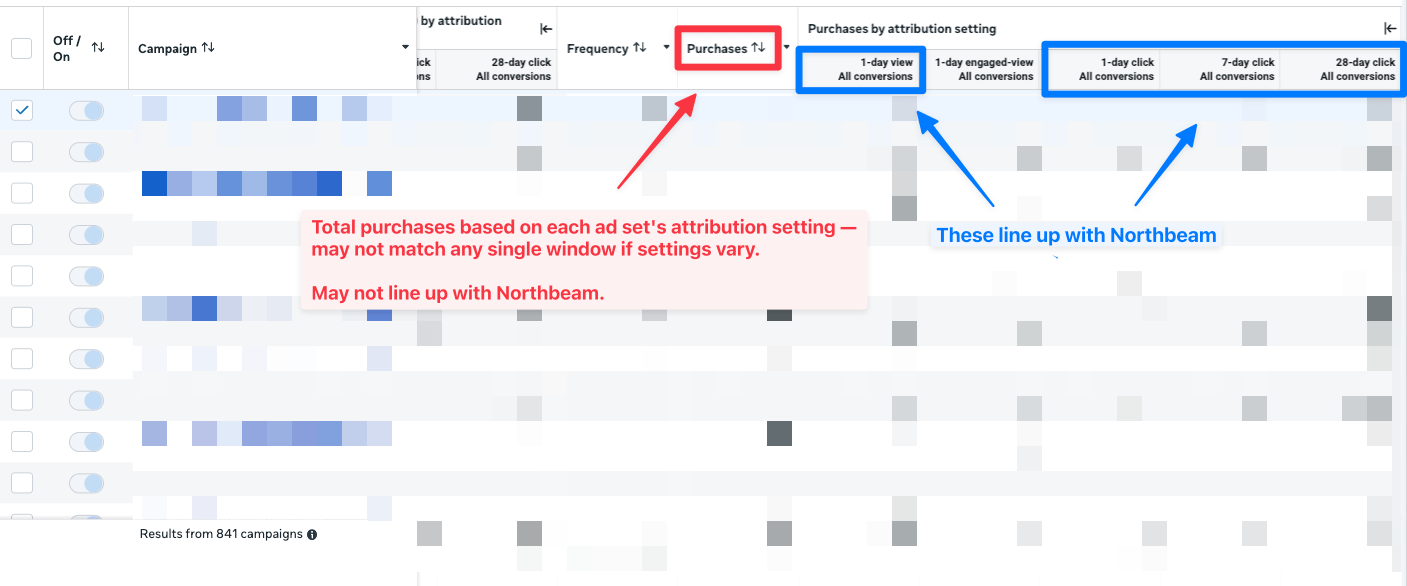
Why are my metrics different in Northbeam than in-platform reporting?7. Why doesn’t Meta-reported Purchases in Northbeam match in-platform?
Northbeam imports Meta purchase conversion volume and value for specific attribution windows, including:- 1D Click
- 1D View
- 7D Click
- 7D Click + 1D View
- Mixed Attribution Settings - Meta’s total can include Ad Sets using different attribution settings. The combined total may not match any single attribution-window column.
- Incremental Model - Ad Sets using Meta’s Incremental attribution model use a holdout-based methodology. Northbeam does not ingest this as one of the standard click or view attribution-window metrics.
- Overlapping attribution windows - Attribution windows are not additive. For example, 7-Day Click includes conversions that also qualify for 1-Day Click. Adding the columns together will double count conversions.
If any Ad Sets use Meta’s Incremental attribution model, Northbeam may not match Meta’s standard in-platform Purchase total.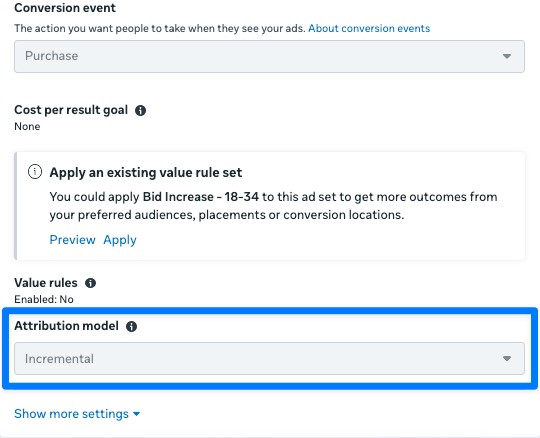
What to do
- Compare Northbeam with Meta’s Purchases by attribution setting, not only Meta’s default Purchase total.
- Check whether your Ad Sets use different attribution settings.
- Check whether any Ad Sets use Meta’s Incremental attribution model.
- Do not add overlapping attribution-window columns together.
8. I think there’s an issue with tracking. Please help!
Start with Troubleshooting Northbeam Data. Then check the following:- Connection: Open Connections and confirm that your Meta Ad Account is still connected and does not show an error.
- Tracking parameters: Confirm that your Meta Ads use Northbeam’s UTM Parameters (
nbtandnb_placement) or one of the supported alternative structures in Step 2. - Off-domain traffic: If an ad first lands on another root domain, confirm that you are using a Northbeam Redirect Link or preserving the original Northbeam UTM Parameters until the visitor reaches your main domain.
- Northbeam Pixel: Confirm that the Northbeam Pixel fires on the landing page. Some third-party landing-page tools or themes may require a separate pixel installation.
- Purchase tracking: Confirm that your Purchase Pixel or server-side purchase tracking is working correctly.
- A-Record Setup: Confirm that the Northbeam A-Record is configured correctly in your DNS settings.