

Before you start, make sure you have:
- A Vibe.co login with access to the advertisers you want to connect
- At least one live Vibe.co campaign on those advertisers
- Access to Connections and Model Settings in Northbeam
1. Connect the account
Sign in to Vibe.co from Northbeam and pick your advertisers.
2. Turn on C+DV
Select Vibe.co as a C+DV platform in Model Settings.
3. Confirm tracking
Check that the connection is syncing.
Connect your Vibe.co account
- Open Connections. If you’re still in onboarding, go to Integrations instead.
- Find Vibe and click Connect.
- Sign in to Vibe.co in the pop-up window.
- Choose which advertisers to share and approve. All advertisers, including future ones means new advertisers sync without reconnecting.
- Confirm your advertisers show on the Vibe card.
Using an API key? Vibe.co turns off API keys on January 1, 2027. Reconnect with the steps above before then.
Turn on Clicks + Deterministic Views
Once your Vibe.co connection is active in Northbeam: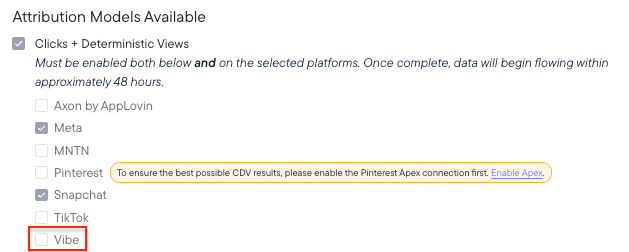
- Go to Settings → Model Settings → Attribution Models.
- Select Clicks + Deterministic Views (C+DV).
- Under Available Platforms, check the box for Vibe.co.
- Click Save Changes.
- Allow up to 48 hours for Vibe.co impression data to show up in your dashboard.
Settings > Model Settings > Attribution Models
Confirm tracking
Once the connection is live:
- Connection syncing: follow Checking platform connections to confirm the account shows as connected and data is arriving.
Supported attribution models
The Vibe.co integration supports these Northbeam attribution models:- First Touch
- Last Touch
- Last Non-Direct Touch
- Clicks-Only
- Clicks + Deterministic Views (C+DV)
Need help?
Troubleshooting Northbeam data
Start here if a check above fails.