

Amazon Integration FAQ
I’ve connected my Amazon Accounts, but don’t see any data?
After connecting, we begin importing your Amazon data, starting with the oldest orders and moving to the newest. The time required to backfill your orders varies based on order volume.How can I check the progress of the backfilling process?
Revenue and Spend are both retrieved starting from the most historical data (Oldest to Newest). Revenue typically takes longer due to the larger volume of data. You can track revenue and order progress anytime on the Orders page (see graphic below).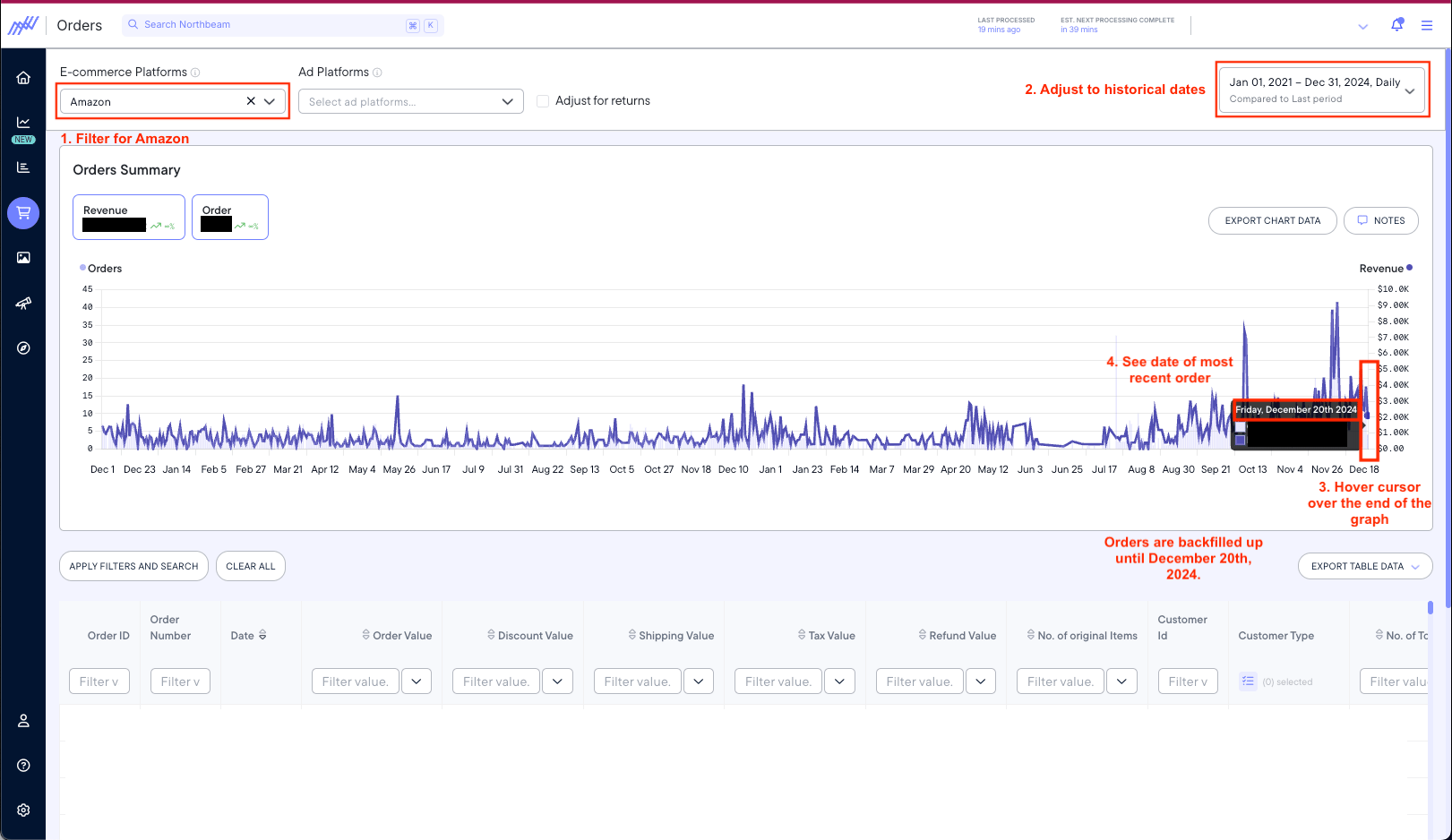
click to zoom
Can Northbeam distinguish between First-time and Returning Amazon Customers?
Yes, for Fulfilled by Amazon (FBA) orders. Northbeam can recover the buyer identifier needed to classify FBA orders as New or Returning. This also applies to historical FBA orders. Orders that were previously classified as Unknown after the February 2026 Amazon change are backfilled and can be updated to New or Returning. A few limitations apply:- Merchant-fulfilled orders cannot currently be classified as New or Returning.
- Recent FBA orders may appear as Unknown for a few days because the buyer identifier becomes available after shipment.
- Canceled orders may not include the buyer identifier needed for classification.
Is there any way to identify New vs Returning Amazon customers now?
There are two options: 1. Within Northbeam (orders-based) Historical Amazon orders fetched prior to February 10, 2026 — where we received a buyer identifier — still retain their New/Returning classification. 2. Amazon Ads “New-to-Brand” platform metrics Amazon Ads provides its own “new-to-brand” metrics that estimate whether a purchase is from a new customer (Amazon’s definition, 14-day lookback). These are calculated by Amazon, not Northbeam’s orders-based identity model, but can serve as a directional signal for new customer acquisition on Ads. You can find these metrics under Amazon Ads reported in your metrics selector: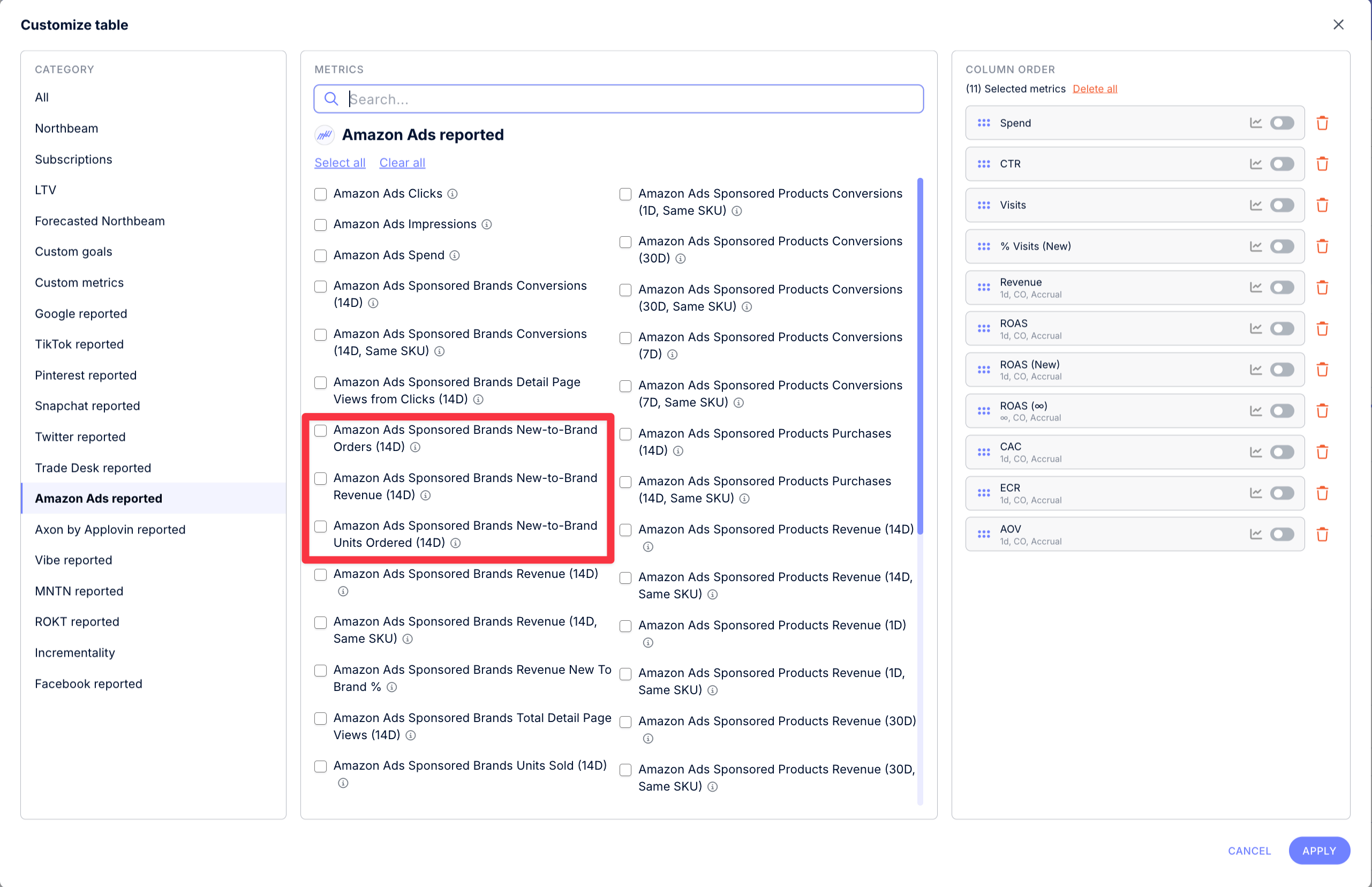
Sales Page > Customize Table > Amazon Ads reported
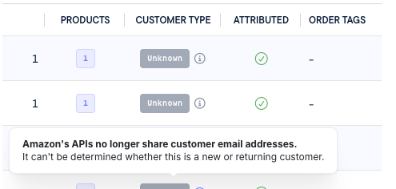
Why are my Amazon orders showing as Unknown?
An Amazon order appears as Unknown when Northbeam does not have the buyer identifier needed to classify it as New or Returning. This can happen when:- The FBA order has not shipped yet.
- Amazon has not made the shipment data available yet.
- The order is merchant-fulfilled.
- The order was canceled.
Why don’t my New + Returning totals match my Amazon totals?
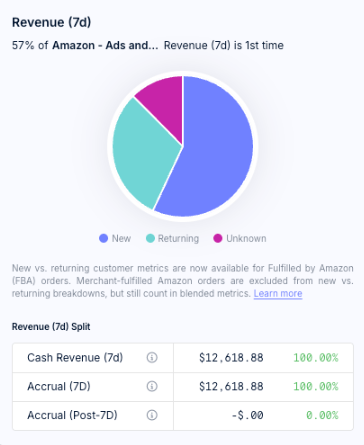
New vs. Returning classification is available for FBA orders, but not for merchant-fulfilled Amazon orders. Some recent FBA orders may also temporarily appear as Unknown while Northbeam waits for shipment data from Amazon. Because these orders still count toward total Amazon Revenue and Orders:New + Returning may be lower than your total Amazon Revenue or Orders.For the most complete view of Amazon performance, use total Amazon metrics instead of adding New + Returning together.
How do I connect an extra account or remove an account?
Reference our step-by-step guide below:Is there an integration with Amazon DSP or Vendor Central?
We’re afraid we do not support Amazon DSP or Vendor Central at this time. If you’d like to upload costs from Amazon DSP, feel free to use a Custom Spendsheet.Why can’t I see Amazon data on hourly view?
Amazon Ads does not provide access to hourly data, thus the data you will see will not be reflective of what is going on hour by hour. However, Amazon Seller does provide reporting accurate to the hour.How do I integrate with Amazon?
Open Connections, then connect Amazon Seller and Amazon Ads. Follow the steps for each that Amazon provides until you’re redirected back to Northbeam. You should see the account become connected.How do I connect multiple Amazon accounts?
Northbeam supports multiple Amazon account connections. Amazon Ads (PPC spend) For Amazon Ads, you can connect multiple regional ad profiles under the same business accounts (e.g., Business (US), Business (CA), Business (UK)). Amazon Seller Central (Revenue) For Amazon Seller Central, you can also connect multiple marketplace groups (e.g., North America, Europe, Far East). However, each connection pulls revenue for all countries within that marketplace group, and it’s not currently possible to filter revenue by individual country within a group. If you’re operating across multiple regions or businesses, you can connect as many accounts as needed to get a full view of your Amazon ad spend and revenue in Northbeam.What is the difference between the Amazon and Amazon Seller connections?
Our Amazon Ads connection gives Northbeam access to your Amazon advertising channel. This includes impression data and spend data broken down by country. The Amazon Seller connection gives us access to your Amazon Seller account data that provides access to your order history.How often is Amazon data updated within Northbeam?
We will update hourly. However, due to limitations in the Amazon APIs, you should treat any data from the last 24 hours as “preliminary results”.How far back does Amazon Ads data go?
For Amazon Ads, we retrieve spend data for the past 58 days from the date the account was linked. For Amazon Seller, we gather orders data starting from January 1, 2000, up to the present.How should I review Amazon data? (By day / week)
We recommend reviewing Amazon data on 3 and 7 day look backs vs day of data.Is this Amazon integration able to see attribution from Facebook / TikTok ads or influencers?
Not currently, though this is something we’re planning to work on in the future.Why are there discrepancies between my daily Amazon Ads spend on Northbeam when compared to looking at the Amazon Ads dashboard?
If there is a difference between the time zone you’ve configured in Amazon Ads and the time zone you’ve configured in Northbeam, you may see a minor discrepancy in your daily spend totals for Amazon Ads.Why is the data seen in Northbeam’s dashboard different from what I see in Amazon’s Seller Central (e.g. Business Report - Sales & Traffic)?
The data can differ due to a variety of reasons:- Timezone: Northbeam’s data is presented in the UTC timezone.
- Order status:
- Canceled orders are not considered in the total revenue
- For merchant-fulfilled orders, we do not have the order total when it’s in Pending status.
- Some discrepancies are expected across Amazon’s reports. This is due to how the data is pivoted and the data source. Go to the following link for more information: https://sellercentral.amazon.com/help/hub/reference/200633570
Where does Northbeam fetch my sales data?
Currently, Northbeam fetches data from three different sources: All Orders Report, Product Fees API, and Order Returns Report.How an order revenue is calculated?
The order total is calculated using this formula:
Why do I see a data discrepancy?
Spend Discrepancies
If there is a difference between the time zone you’ve configured in Amazon Ads and the time zone you’ve configured in Northbeam, you may see a minor discrepancy in your daily spend totals for Amazon Ads.Order Discrepancies
Our orders and revenue should match the following report in Amazon Seller Central: Business Report - Sales & Traffic However, the data can differ due to a variety of reasons:- Timezone: Northbeam’s data is presented in the UTC timezone.
- Order status:
- Canceled orders are not considered in the total revenue
- For merchant-fulfilled orders, we do not have the order total when it’s in Pending status.
If you suspect a tracking issue, please review the following
- Connection: Make sure your accounts are still connected. Open Connections and check for any errors. Connections could break for a variety of reasons, but most commonly, the user losing access to the ad account.