 | Header | Value | Description |
| - | - | - |
| `Authorization` | `
| Header | Value | Description |
| - | - | - |
| `Authorization` | `
| Field | Type | Description |
| :- | :- | :- |
| `order_id` | string | Unique identifier for the order.
Must match the `id` in [firePurchaseEvent](https://northbeam-pixel-api.readme.io/recipes/fire-purchase-event) so we can pair website events with orders. | | `customer_id` | string | Must be unique per customer in your OMS. | | `customer_email` | string | The email associated with the customer. | | `time_of_purchase` | date-time (ISO-8601) | Must be in ISO-8601 format.
**Must occur AFTER the frontend [firePurchaseEvent](https://northbeam-pixel-api.readme.io/recipes/fire-purchase-event).**
Include a timezone offset if not reporting in UTC.
**Example:** FPE timestamp = `2025-09-29T15:30:00Z`
❌ `2025-09-29T15:00:00Z` (too early)
✅ `2025-09-29T15:31:00Z` (UTC)
✅ `2025-09-29T15:31:00-07:00` (with offset) | | `currency` | string | ISO-4217 currency code (e.g., USD).
All monetary fields assume this currency. | | `purchase_total` | number | Total collected including tax, shipping, and fees. | | `tax` | number | Amount paid as tax.
Required if you want taxes deducted from revenue in reporting. | | `shipping_cost` | number | Amount paid for shipping.
Required if you want shipping deducted from revenue in reporting. | | `products` | array of objects | Must contain at least one product.
**Required keys:** `id` (string), `name` (string), `quantity` (number), `price` (number)
**Optional keys:** `variant_id` (string), `variant_name` (string) | | `order_tags` | array of strings | Required for offline orders.
Used to mark subscription stage or exclude orders from attribution. | | `refunds` | array of objects | Used to keep revenue calculations correct.
**Required keys:** `product_id` (string), `quantity` (number), `refund_amount` (number), `refund_made_at` (date-time)
If you want refunds broken out in reporting, you must also include an `order_tag`. | | `customer_shipping_address` | object | Enables Customer LTV reporting by region and state.
**Required keys if included:** `address1` (string), `address2` (string), `city` (string), `state` (string), `zip` (string), `country_code` (string) | | `discount_codes` | array of strings | Enables Customer LTV by discount code. | | `discount_amount` | number | Required if you want discounts broken out in dashboard reporting. |
### Example payload
```json theme={null}
[
{
"order_id": "abc-123",
"customer_id": "def-456",
"customer_email": "example@gmail.com",
"time_of_purchase": "2025-09-29T15:31:00Z",
"currency": "USD",
"purchase_total": 110.99,
"tax": 5.00,
"shipping_cost": 10.99,
"products": [
{
"id": "prod-1",
"name": "Sample Product",
"quantity": 1,
"price": 95.00,
"variant_id": "var-1",
"variant_name": "Size M"
}
],
"order_tags": [
"Online Order",
"Subscription First"
],
"refunds": [
{
"product_id": "prod-1",
"quantity": 1,
"refund_amount": 10.00,
"refund_made_at": "2025-09-30T10:00:00Z"
}
],
"customer_shipping_address": {
"address1": "123 Main St.",
"address2": "Apt. 1A",
"city": "San Francisco",
"state": "CA",
"zip": "94112",
"country_code": "USA"
},
"discount_codes": [
"WELCOME10"
],
"discount_amount": 10.00
}
]
```
## Verify your payload
Before sending the orders, confirm your payload structure and values are valid. Most issues come from malformed payloads or missing fields.
**Common validation checks:**
* ✅ `order_id` must be unique per order and match the `id` used in `firePurchaseEvent`.
* ✅ `time_of_purchase` must be **AFTER** the corresponding `firePurchaseEvent` timestamp and in proper ISO-8601 format with timezone offset.
* ✅ `products` array must include at least one product with `id`, `name`, `quantity`, and `price`.
* ✅ `currency` must be a valid ISO-4217 code (e.g., `USD`, `EUR`).
* ✅ `customer_email` must match the email on the actual order in your OMS (case-sensitive in some systems).
* ✅ `customer_id` accuracy is critical – this is what Northbeam uses to distinguish between new and returning customers. If it’s inconsistent (e.g., mixing Shopify IDs and internal IDs), customer LTV and new/returning logic will be incorrect.
* ✅ `order_tags` are required and used for two main purposes:
* **Subscriptions** – Use distinct tags to separate:
1. First-time subscription orders (subscription starts)
2. Recurring subscription renewals (auto-charges that happen in the backend)
* **Offline Orders** – Tag any orders not placed through your live production website (and therefore without frontend pixel events). Our team excludes these from diagnostics monitoring.
* ✅ `refunds` objects must include `product_id`, `quantity`, `refund_amount`, and `refund_made_at`.
* ✅ If including `customer_shipping_address`, all required subfields (`address1`, `city`, `state`, `zip`, `country_code`) must be present.
Must match the `id` in [firePurchaseEvent](https://northbeam-pixel-api.readme.io/recipes/fire-purchase-event) so we can pair website events with orders. | | `customer_id` | string | Must be unique per customer in your OMS. | | `customer_email` | string | The email associated with the customer. | | `time_of_purchase` | date-time (ISO-8601) | Must be in ISO-8601 format.
**Must occur AFTER the frontend [firePurchaseEvent](https://northbeam-pixel-api.readme.io/recipes/fire-purchase-event).**
Include a timezone offset if not reporting in UTC.
**Example:** FPE timestamp = `2025-09-29T15:30:00Z`
❌ `2025-09-29T15:00:00Z` (too early)
✅ `2025-09-29T15:31:00Z` (UTC)
✅ `2025-09-29T15:31:00-07:00` (with offset) | | `currency` | string | ISO-4217 currency code (e.g., USD).
All monetary fields assume this currency. | | `purchase_total` | number | Total collected including tax, shipping, and fees. | | `tax` | number | Amount paid as tax.
Required if you want taxes deducted from revenue in reporting. | | `shipping_cost` | number | Amount paid for shipping.
Required if you want shipping deducted from revenue in reporting. | | `products` | array of objects | Must contain at least one product.
**Required keys:** `id` (string), `name` (string), `quantity` (number), `price` (number)
**Optional keys:** `variant_id` (string), `variant_name` (string) | | `order_tags` | array of strings | Required for offline orders.
Used to mark subscription stage or exclude orders from attribution. | | `refunds` | array of objects | Used to keep revenue calculations correct.
**Required keys:** `product_id` (string), `quantity` (number), `refund_amount` (number), `refund_made_at` (date-time)
If you want refunds broken out in reporting, you must also include an `order_tag`. | | `customer_shipping_address` | object | Enables Customer LTV reporting by region and state.
**Required keys if included:** `address1` (string), `address2` (string), `city` (string), `state` (string), `zip` (string), `country_code` (string) | | `discount_codes` | array of strings | Enables Customer LTV by discount code. | | `discount_amount` | number | Required if you want discounts broken out in dashboard reporting. |
 ### Error trends
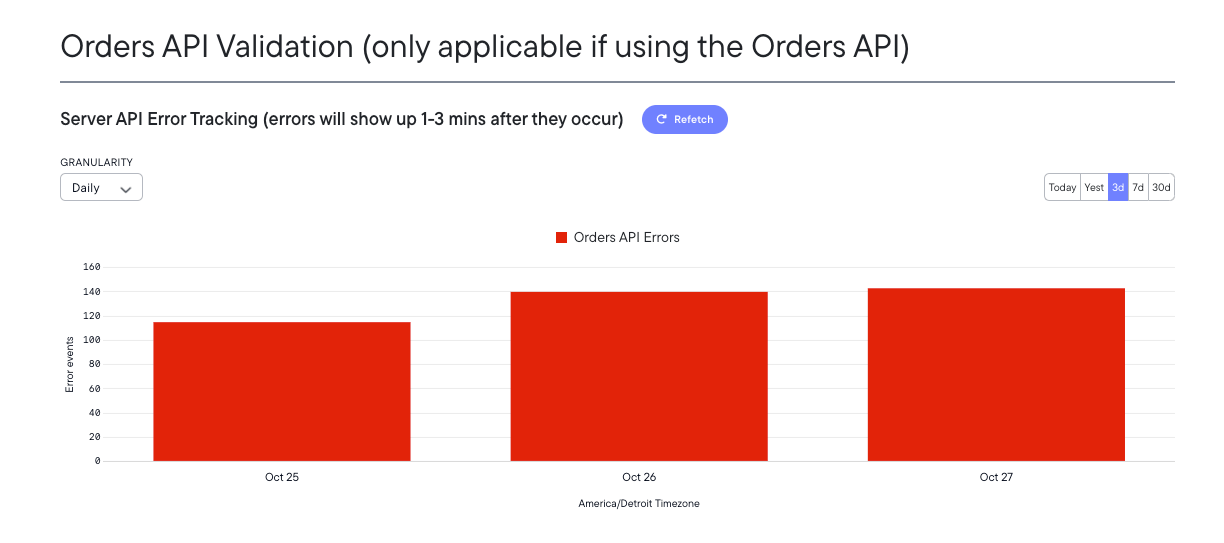
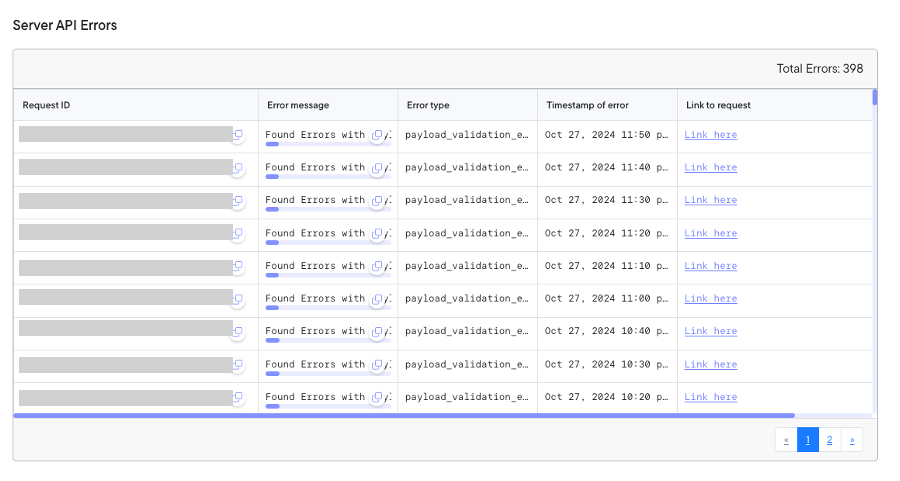
* A chart shows API error counts over time (1–30 day ranges available).
* Errors typically appear within **1–3 minutes** after they occur.
* Use this view to identify spikes or recurring issues.
### Error trends
* A chart shows API error counts over time (1–30 day ranges available).
* Errors typically appear within **1–3 minutes** after they occur.
* Use this view to identify spikes or recurring issues.