> ## Documentation Index
> Fetch the complete documentation index at: https://docs.northbeam.io/llms.txt
> Use this file to discover all available pages before exploring further.

# Northbeam Metrics 101

> Use this guide to understand our metrics

It's important to understand what our different metrics mean and how they may be different from the metrics you're used to seeing.

## Finding Metrics in the Dashboard

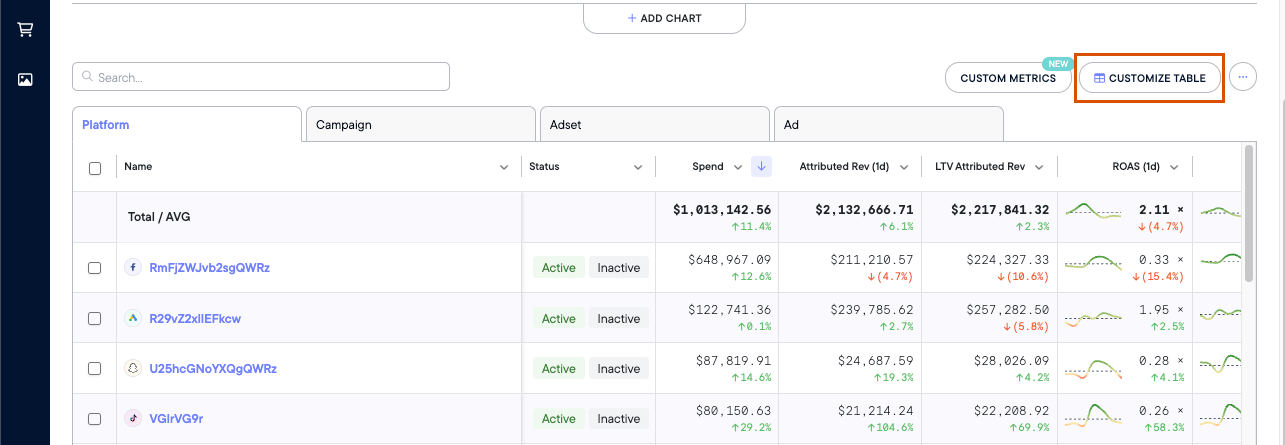
To find the full list of our metrics within your dashboard:

1. Navigate to the **Attribution Page**
2. Click **Customize ⚙️**

From here, you'll see a list of all the metrics we provide and you'll be able to add/remove any from your view:

<Frame>
  <img src="https://mintcdn.com/northbeam/EpMPeQ8Ec2Yrg9EI/images/readme/3dc11c2c-5dbb441-Screen_Shot_2024-03-12_at_10.21.12_AM.png?fit=max&auto=format&n=EpMPeQ8Ec2Yrg9EI&q=85&s=7fd768989dd6a074843623c49191965a" alt="" width="1285" height="445" data-path="images/readme/3dc11c2c-5dbb441-Screen_Shot_2024-03-12_at_10.21.12_AM.png" />
</Frame>

***

## Northbeam Conversion Metrics

Conversion metics are by far the most commonly used metrics within Northbeam.

**Note: All conversion metrics in Accrual Accounting mode are reported in an Attribution Window, which is denoted in the metric name.**

Examples:

* Transactions (1d) - Transactions completed in a 1-day window
* Attributed Rev (1d) - Revenue in a 1-day window
* ROAS (7d) - Return on Ad Spend calculated with Revenue in a 7-day window

**Learn more about our[Attribution Windows here](/docs/attribution-windows).**

For simplicity, we have omitted the attribution windows from the list below.

<table>
  <thead>
    <tr>
      <th>
        Metric Name
      </th>

      <th>
        Definition
      </th>

      <th>
        Calculation or Notes
      </th>
    </tr>
  </thead>

  <tbody>
    <tr>
      <td>
        Transactions
      </td>

      <td>
        Number of Transactions from All Customers
      </td>

      <td>
        *
      </td>
    </tr>

    <tr>
      <td>
        Transactions (New)
      </td>

      <td>
        Number of Transactions from New Customers
      </td>

      <td>
        *
      </td>
    </tr>

    <tr>
      <td>
        Transactions (Returning)
      </td>

      <td>
        Number of Transactions from Returning Customers
      </td>

      <td>
        *
      </td>
    </tr>

    <tr>
      <td>
        Attributed Rev
      </td>

      <td>
        Attributed Revenue from All Customers
      </td>

      <td>
        Revenue attributed to touchpoints in the given time period. Available in Accrual Accounting.
      </td>
    </tr>

    <tr>
      <td>
        Attributed Rev (New)
      </td>

      <td>
        Attributed Revenue from New Customers
      </td>

      <td>
        Revenue attributed to touchpoints in the given time period. Available in Accrual Accounting.
      </td>
    </tr>

    <tr>
      <td>
        Attributed Rev (Returning)
      </td>

      <td>
        Attributed Revenue from Returning Customers
      </td>

      <td>
        Revenue attributed to touchpoints in the given time period. Available in Accrual Accounting.
      </td>
    </tr>

    <tr>
      <td>
        Rev
      </td>

      <td>
        Revenue from All Customers
      </td>

      <td>
        Only available in Cash Accounting. No attribution windows available.
      </td>
    </tr>

    <tr>
      <td>
        Rev (New)
      </td>

      <td>
        Revenue from New Customers
      </td>

      <td>
        Only available in Cash Accounting. No attribution windows available.
      </td>
    </tr>

    <tr>
      <td>
        Rev (Returning)
      </td>

      <td>
        Revenue from Returning Customers
      </td>

      <td>
        Only available in Cash Accounting. No attribution windows available.
      </td>
    </tr>

    <tr>
      <td>
        AOV
      </td>

      <td>
        Average Order Value from All Customers
      </td>

      <td>
        Cash: Rev ÷ Transactions

        Accrual: Attributed Rev ÷ Transactions
      </td>
    </tr>

    <tr>
      <td>
        AOV (New)
      </td>

      <td>
        Average Order Value from New Customers
      </td>

      <td>
        Cash: Rev (New)  ÷ Transactions (New)

        Accrual: Attributed Rev (New) ÷ Transactions (New)
      </td>
    </tr>

    <tr>
      <td>
        AOV (Returning)
      </td>

      <td>
        Average Order Value from Returning Customers
      </td>

      <td>
        Cash: Rev (Returning)  ÷ Transactions (Returning)

        Accrual: Attributed Rev (Returning) ÷ Transactions (Returning)
      </td>
    </tr>

    <tr>
      <td>
        Refunds
      </td>

      <td>
        Returns, refunds, AND cancellations from All Customers
      </td>

      <td>
        *
      </td>
    </tr>

    <tr>
      <td>
        Refunds (New)
      </td>

      <td>
        Returns, refunds, AND cancellations from First Time Customers
      </td>

      <td>
        *
      </td>
    </tr>

    <tr>
      <td>
        Refunds (Returning)
      </td>

      <td>
        Returns, refunds, AND cancellations from Returning Customers
      </td>

      <td>
        *
      </td>
    </tr>

    <tr>
      <td>
        Shipping
      </td>

      <td>
        Shipping Costs from All Customers
      </td>

      <td>
        *
      </td>
    </tr>

    <tr>
      <td>
        Shipping (New)
      </td>

      <td>
        Shipping Costs from New Customers
      </td>

      <td>
        *
      </td>
    </tr>

    <tr>
      <td>
        Shipping (Returning)
      </td>

      <td>
        Shipping Costs from Returning Customers
      </td>

      <td>
        *
      </td>
    </tr>

    <tr>
      <td>
        Tax
      </td>

      <td>
        Taxes from All Customers
      </td>

      <td>
        *
      </td>
    </tr>

    <tr>
      <td>
        Tax (New)
      </td>

      <td>
        Taxes from New Customers
      </td>

      <td>
        *
      </td>
    </tr>

    <tr>
      <td>
        Tax (Returning)
      </td>

      <td>
        Taxes from Returning Customers
      </td>

      <td>
        *
      </td>
    </tr>

    <tr>
      <td>
        Discounts
      </td>

      <td>
        Discounts from All Customers
      </td>

      <td>
        *
      </td>
    </tr>

    <tr>
      <td>
        Discounts (New)
      </td>

      <td>
        Discounts from New Customers
      </td>

      <td>
        *
      </td>
    </tr>

    <tr>
      <td>
        Discounts (Returning)
      </td>

      <td>
        Discounts from Returning Customers
      </td>

      <td>
        *
      </td>
    </tr>

    <tr>
      <td>
        CAC
      </td>

      <td>
        All Customer Acquisition Cost
      </td>

      <td>
        Spend ÷ Transactions
      </td>
    </tr>

    <tr>
      <td>
        CAC (New)
      </td>

      <td>
        New Customer Acquisition Cost
      </td>

      <td>
        Spend ÷ Transactions (New)
      </td>
    </tr>

    <tr>
      <td>
        CAC (Returning)
      </td>

      <td>
        Returning Customer Acquisition Cost
      </td>

      <td>
        Spend  ÷ Transactions (Returning)
      </td>
    </tr>

    <tr>
      <td>
        ROAS
      </td>

      <td>
        Return on Ad Spend from All Customers
      </td>

      <td>
        Attributed Rev ÷ Spend
      </td>
    </tr>

    <tr>
      <td>
        ROAS (New)
      </td>

      <td>
        Return on Ad Spend from New Customers
      </td>

      <td>
        Attributed Rev (New) ÷ Spend
      </td>
    </tr>

    <tr>
      <td>
        ROAS (Returning)
      </td>

      <td>
        Return on Ad Spend From Returning Customers
      </td>

      <td>
        Attributed Rev (Returning) ÷ Spend
      </td>
    </tr>

    <tr>
      <td>
        MER
      </td>

      <td>
        Media Efficiency Ratio from all Customers
      </td>

      <td>
        Rev ÷ Spend
      </td>
    </tr>

    <tr>
      <td>
        MER (New)
      </td>

      <td>
        Media Efficiency Ratio from New Customers
      </td>

      <td>
        Rev (New) ÷ Spend
      </td>
    </tr>

    <tr>
      <td>
        MER (Returning)
      </td>

      <td>
        Media Efficiency Ratio from Returning Customers
      </td>

      <td>
        Rev (Returning) ÷ Spend
      </td>
    </tr>

    <tr>
      <td>
        ECR
      </td>

      <td>
        E-Commerce Conversion Rate from All Customers
      </td>

      <td>
        Transactions ÷ Visits
      </td>
    </tr>

    <tr>
      <td>
        ECR (New)
      </td>

      <td>
        E-Commerce Conversion Rate from New Customers
      </td>

      <td>
        Transactions (New) ÷ Visits
      </td>
    </tr>

    <tr>
      <td>
        ECR (Returning)
      </td>

      <td>
        E-Commerce Conversion Rate from Returning Customers
      </td>

      <td>
        Transactions (Returning) ÷ Visits
      </td>
    </tr>
  </tbody>
</table>

***

## Northbeam Click Metrics

Below are Click-Based metrics. Keep in mind, we use Visits when calculating these formulas, not Clicks.

<table>
  <thead>
    <tr>
      <th>
        Metric Name
      </th>

      <th>
        Definition
      </th>

      <th>
        Calculation or Notes
      </th>
    </tr>
  </thead>

  <tbody>
    <tr>
      <td>
        Visits
      </td>

      <td>
        Visits to your website
      </td>

      <td>
        Tracked via Northbeam Pixel.

        Visits are different from Clicks. Not all Clicks result in a Visit, so Visits are usually lower than in-platform Clicks.
      </td>
    </tr>

    <tr>
      <td>
        New Visits
      </td>

      <td>
        Visits to your website from new visitors
      </td>

      <td>
        New Visitors are determined by the Northbeam Pixel and our device graph.
      </td>
    </tr>

    <tr>
      <td>
        % New Visits
      </td>

      <td>
        Percentage of first-time website visitors
      </td>

      <td>
        (New Visits ÷ Visits) × 100
      </td>
    </tr>

    <tr>
      <td>
        CPM
      </td>

      <td>
        Cost Per Mille, or Cost per 1000 Impressions
      </td>

      <td>
        (Spend ÷ Impressions) × 1000
      </td>
    </tr>

    <tr>
      <td>
        CTR
      </td>

      <td>
        Click-Thru Rate
      </td>

      <td>
        Visits ÷ Impressions

        We use Visits in this formula, not Clicks.
      </td>
    </tr>

    <tr>
      <td>
        eCPC
      </td>

      <td>
        Cost per Visit
      </td>

      <td>
        Spend ÷ Visits

        We use Visits in this formula, not Clicks.
      </td>
    </tr>

    <tr>
      <td>
        eCPNV
      </td>

      <td>
        Cost per New Visit
      </td>

      <td>
        Spend ÷ New Visits
      </td>
    </tr>
  </tbody>
</table>

***

## In-Platform Metrics

All metrics below are pulled directly from each ad platform via API connection.

<table>
  <thead>
    <tr>
      <th>
        Platform
      </th>

      <th>
        What's Included
      </th>

      <th>
        Attribution Model
      </th>

      <th>
        Default Attribution Window
      </th>
    </tr>
  </thead>

  <tbody>
    <tr>
      <td>
        Spend
      </td>

      <td>
        Ad spend across all platforms
      </td>

      <td>
        \--
      </td>

      <td>
        \--
      </td>
    </tr>

    <tr>
      <td>
        Impressions
      </td>

      <td>
        Number of times ads were served
      </td>

      <td>
        \--
      </td>

      <td>
        \--
      </td>
    </tr>

    <tr>
      <td>
        Facebook
      </td>

      <td>
        Clicks, creative data, and conversion metrics reported by Facebook
      </td>

      <td>
        Last-click
      </td>

      <td>
        Attribution windows are labeled directly in each metric name
      </td>
    </tr>

    <tr>
      <td>
        TikTok
      </td>

      <td>
        Clicks, creative data, and conversion metrics reported by TikTok
      </td>

      <td>
        Last-click
      </td>

      <td>
        Reflects the account's Attribution Manager settings.

        *Default: 7-day click / 1-day view-through*
      </td>
    </tr>

    <tr>
      <td>
        Google
      </td>

      <td>
        Clicks, creative data, and conversion metrics reported by Google
      </td>

      <td>
        Data-driven (default) or Last-click
      </td>

      <td>
        Reflects the window configured per conversion action in the account.

        *Default: 30-day click / 1-day view-through*
      </td>
    </tr>

    <tr>
      <td>
        AppLovin
      </td>

      <td>
        Clicks, creative data, and conversion metrics reported by Applovin
      </td>

      <td>
        Last-click
      </td>

      <td>
        Attribution windows are labeled directly in each metric name
      </td>
    </tr>

    <tr>
      <td>
        Snapchat
      </td>

      <td>
        Clicks, creative data, and conversion metrics reported by Snapchat
      </td>

      <td>
        Last-click
      </td>

      <td>
        Reflects the account's Optimization Window setting.

        *Default: 28-day swipe / 1-day view-through*
      </td>
    </tr>

    <tr>
      <td>
        Pinterest
      </td>

      <td>
        Clicks, creative data, and conversion metrics reported by Pinterest
      </td>

      <td>
        Last-click
      </td>

      <td>
        30-day click / 30-day view-through
      </td>
    </tr>

    <tr>
      <td>
        Twitter (X)
      </td>

      <td>
        Clicks, creative data, and conversion metrics reported by Twitter
      </td>

      <td>
        Last-click
      </td>

      <td>
        Reflects the window configured per conversion event in the account.

        *Default: 30-day post-engagement / 1-day post-view*
      </td>
    </tr>

    <tr>
      <td>
        MNTN
      </td>

      <td>
        Clicks, creative data, and conversion metrics reported by MNTN
      </td>

      <td>
        Last-click
      </td>

      <td>
        Reflects the account's Verified Visit window settings.

        *Default: 7-day visit window (Retargeting) / 14-day visit window (Prospecting) + fixed 30-day conversion window*)
      </td>
    </tr>
  </tbody>
</table>

<br />
