> ## Documentation Index
> Fetch the complete documentation index at: https://docs.northbeam.io/llms.txt
> Use this file to discover all available pages before exploring further.

# Northbeam's Data Sources

> Where does Northbeam get its data from?

Here is a breakdown of our data sources as well as how they work together to capture the full customer journey.

## Frontend Data Source

<table>
  <thead>
    <tr>
      <th style={{ textAlign: "left" }} />

      <th style={{ textAlign: "left" }}>
        [Northbeam Pixel](/docs/add-pixel)
      </th>

      <th style={{ textAlign: "left" }}>
        [Purchase Events](/docs/add-pixel)
      </th>

      <th style={{ textAlign: "left" }}>
        UTM Parameters
      </th>

      <th style={{ textAlign: "left" }}>
        First-Party Cookies
      </th>
    </tr>
  </thead>

  <tbody>
    <tr>
      <td style={{ textAlign: "left" }}>
        What is it?
      </td>

      <td style={{ textAlign: "left" }}>
        A small code snippet embedded in your website.
      </td>

      <td style={{ textAlign: "left" }}>
        Northbeam provides a variety of scripts to track conversions. This includes purchases, email sign ups, or even a custom goal.
      </td>

      <td style={{ textAlign: "left" }}>
        Tags added to URLs to track where traffic comes from (e.g., ads, emails, social).
      </td>

      <td style={{ textAlign: "left" }}>
        Small data files set by the website a user visits.
      </td>
    </tr>

    <tr>
      <td style={{ textAlign: "left" }}>
        What does it do?
      </td>

      <td style={{ textAlign: "left" }}>
        Collects behavioral data from visitors, including Marketing touchpoints & Pages visited.

        Feeds data into Northbeam's backend device graph.

        Tracks complete customer journeys from initial visit to purchase.
      </td>

      <td style={{ textAlign: "left" }}>
        These scripts are unique to Northbeam. They feed into your device graph and displayed in your dashboard
      </td>

      <td style={{ textAlign: "left" }}>
        Helps connect conversion events to the ad or marketing channel that drove them.
      </td>

      <td style={{ textAlign: "left" }}>
        Stores login, preferences, and browsing behavior.
      </td>
    </tr>
  </tbody>
</table>

### How Northbeam tracks using First-Party Cookies

* Northbeam sets up first-party tracking using a subdomain (e.g., i.store.com).
* This subdomain is owned by your domain, making tracking first-party and not blocked by browsers.
* First-party cookies store user data, and pixel events are sent securely to your Northbeam dashboard
* This ensures accurate attribution and privacy-compliant tracking without relying on third-party cookies.

## Backend Data Source

| Shopify Integration                                                                                                                    |
| :------------------------------------------------------------------------------------------------------------------------------------- |
| Northbeam natively integrates with Shopify, allowing us to fetch all your order data and establish a reliable revenue source of truth. |

### We rely on server-side data as the source of truth to ensure we capture all order information—including orders that don’t fire web pixels. This includes

* Offline Orders
* Draft Orders
* Recurring Subscriptions
* Other cases where client-side tracking misses

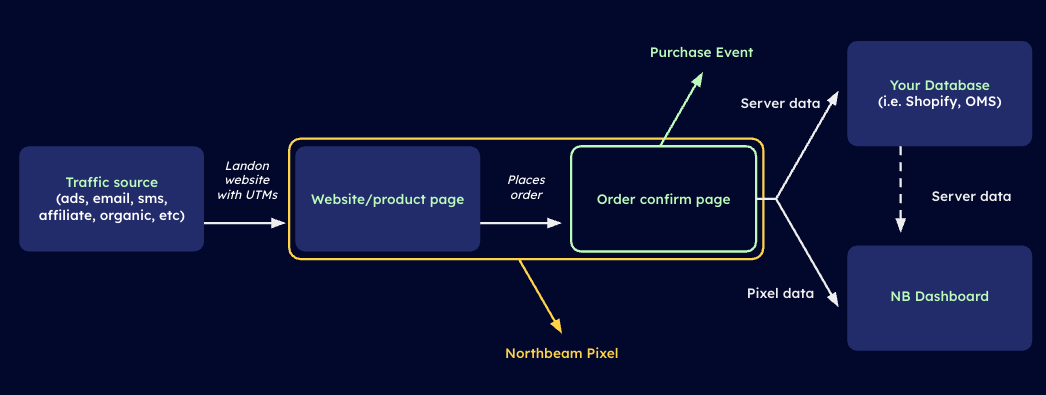
## Connecting Frontend and Backend

<Frame>
  <img src="https://mintcdn.com/northbeam/EpMPeQ8Ec2Yrg9EI/images/readme/ca27b5fd-Screenshot_2025-04-16_at_6.32.44_PM.png?fit=max&auto=format&n=EpMPeQ8Ec2Yrg9EI&q=85&s=1f2c8b03aa88b0a31c46400e4555d0c9" alt="" width="1046" height="395" data-path="images/readme/ca27b5fd-Screenshot_2025-04-16_at_6.32.44_PM.png" />
</Frame>

Northbeam's data sources work together to give you the most accurate and complete view of customer's journey. Please submit a [Support ticket here](https://www.northbeam.io/submit-a-support-ticket) if you have any further questions.