> ## Documentation Index
> Fetch the complete documentation index at: https://docs.northbeam.io/llms.txt
> Use this file to discover all available pages before exploring further.
# 🏍️ Northbeam Apex
> Optimize your Meta ads against first-party Northbeam data with this new integration.
## What is Northbeam Apex?
**Northbeam Apex is a direct integration between Northbeam and our advertising platform partners that lets the partner fold Northbeam's first-party, multi-touch attribution signal directly into how they optimize ad delivery.**
With Apex, participating platform partners can integrate Northbeam's MTA-derived performance into their algorithm's optimization process — so ad delivery is optimized against the data you already trust, instead of platform-default last-click.
With a more informed, cross-channel signal built from your actual orders and the touchpoints leading to them, the platform's algorithm can better understand how your ads affect the entire customer journey and **optimize more effectively than ever before.**
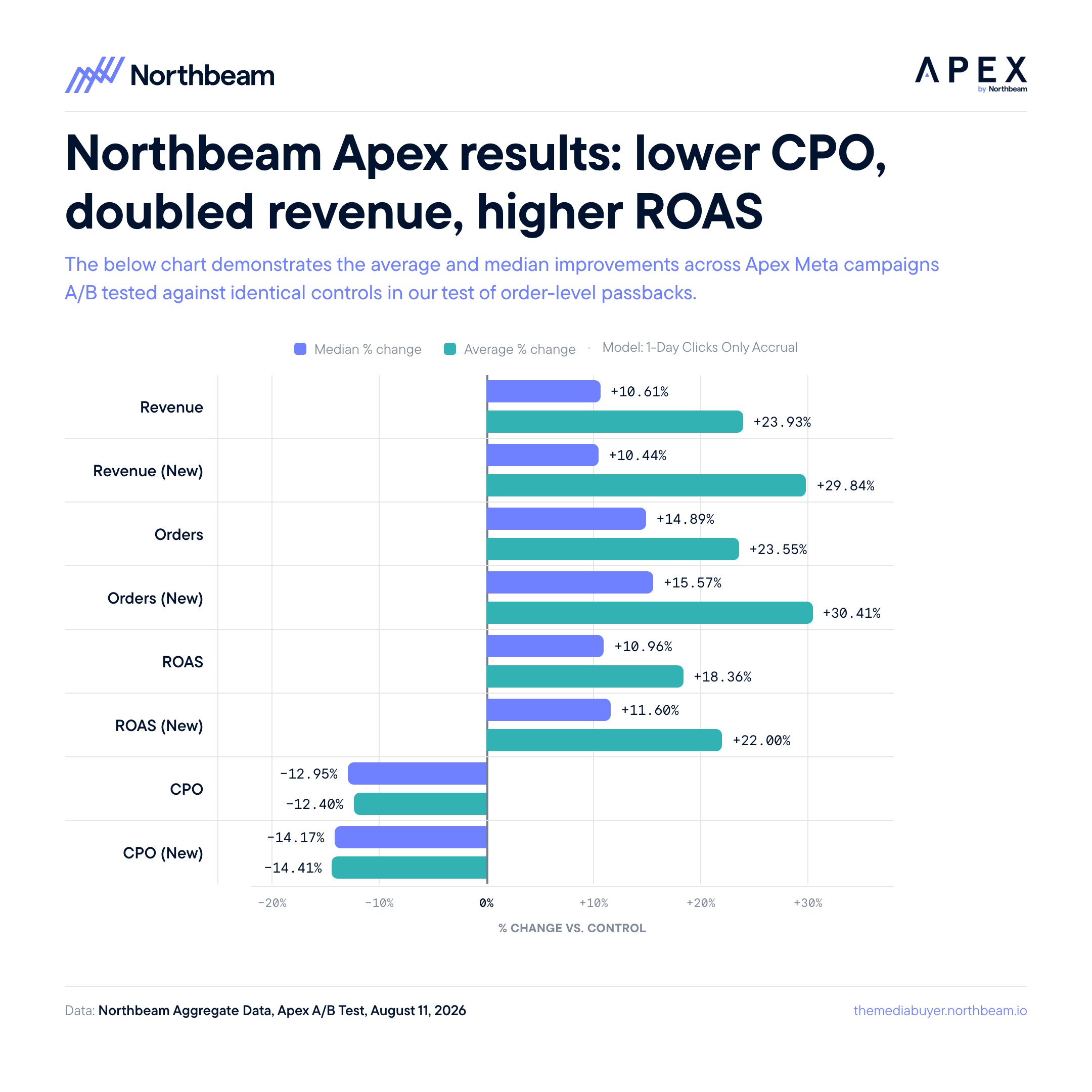
**In short: activating Apex could help you find as much as +25% ROAS with the press of a button. **
These are the results of our most recent A/B testing of Apex-empowered campaigns versus controls.
***
## How does Apex work?
Apex flips the standard model: instead of sending the platform more raw events for it to attribute itself, **Northbeam does the attribution first** and sends the platform the result.
* Northbeam captures first-party events via its own pixel and your order feed.
* Northbeam's ML-based MTA model splits credit across every touchpoint in the customer journey.
* Apex sends the Northbeam-attributed performance for each ad to the partner platform.
* The partner uses that signal to optimize ad delivery against the outcomes you actually care about.
The result is the platform's auction aligning to how *you* measure success — not how it measures it by default.
### **Apex is additive.**
It does not replace your existing pixel or CAPI connections. Your existing setup keeps working exactly as it does today. Apex adds a parallel, attributed signal the platform uses to optimize differently.
***
## Apex vs. CAPI and enrichment tools
A common question: *I already send Meta enriched conversion data through a CAPI-based products — does Apex conflict with that, or make it redundant?*
**Neither. They solve two different problems, and they compound.**
| | **Enrichment / CAPI-based products** | **Northbeam Apex** |
| - | - | - |
| **What it sends** | The raw conversion, enriched with as much identity and order detail as possible | Northbeam's attributed credit for that conversion |
| **What that does** | Helps Meta match as many conversions as possible back to ad interactions | Helps Meta understand which ads actually drove the outcome |
| **Question it answers** | "Did Meta touch this customer at all?" | "How much of this sale does Meta deserve?" |
### A single order, end to end
On Monday, a \$100 order comes into your store.
**Your enrichment tool shares the conversion itself:**
* Order value
* Customer email
* Customer ID
* Phone number
* Product purchased
* Etc.
Meta uses that to match the buyer to any ad interactions it drove — connecting the dots between the order and the touchpoints that preceded it.
**Northbeam Apex then shares the credit:**
* Of that \$100, Northbeam's MTA model determines Meta contributed **\$45**.
Meta optimizes delivery toward the ads earning that \$45 — not toward its own last-click view of the same order.
### Enrichment connects the dots. Apex weights them.
Enrichment tools make sure Meta **sees** every conversion and touchpoint. Apex tells Meta **how much credit** those touchpoints actually deserve. Keep both — leave your existing pixel and CAPI setup exactly as it is.
***
## Apex: two pieces to understand
There are two distinct components to Apex, and it's important to understand them separately:
#### 1. The data connection
This is what you set up in Northbeam. Turning this on starts sending Northbeam's order-level MTA data to the platform. It trains the platform's model. It does not turn on live optimization.
#### 2. The optimization layer
This is how the platform actually uses Apex data to optimize your campaigns.
On Meta, this is called **Custom Attribution** and is configured at the ad-set level in Meta Ads Manager. This layer is currently in beta for Meta, with broader rollout during 2026.
***
## Supported platforms
| **Platform** | **Status** |
| - | - |
| **Meta** | All customers can set up Apex data sharing today. |
| **Snap** | Closed beta; no timeline on broader rollout. |
| **AppLovin** | Available. |
| **Pinterest** | Apex consent is required to access Clicks + Deterministic Views (C+DV). Apex is not currently used for Pinterest optimization. |
| **Others** | Additional platform integrations are on the roadmap. |
***
## Setting up Apex
### Before you start
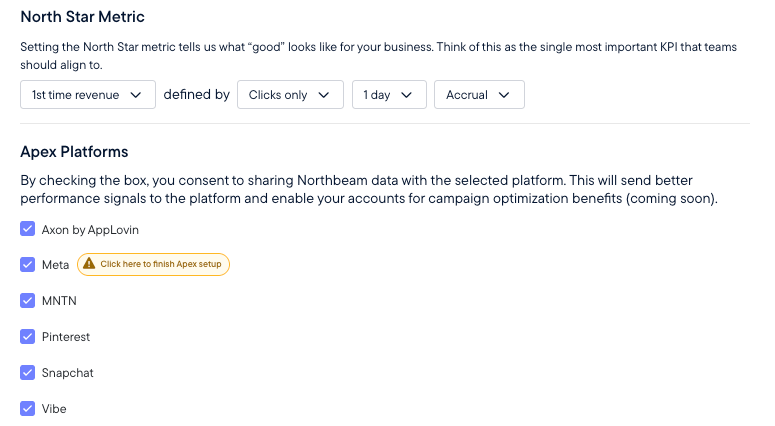
Regardless of platform, setup begins in [Apex](https://dashboard.northbeam.io/settings/apex) in your Northbeam dashboard. You'll define your **North Star metric** — the signal Apex sends to the platform to optimize toward:
* **Revenue type:** First-Time, Returning, or Blended
* **Attribution model:** Clicks-Only, Clicks + Deterministic Views (CDV), Last Touch, Linear, or First Touch
* **Attribution window:** 1 / 3 / 7 days
* **Accounting mode:** Accrual
Once your North Star is set, enable Apex consent for your desired platform(s) in the same settings page.
### **Changing your North Star after setup resets the model's calibration period.**
Plan for approximately two weeks before the model is fully re-warmed. Coordinate with your CSM before making changes if you have active optimization campaigns running.
***
### Meta
Meta is the most fully featured Apex integration today and the most common starting point. The setup below is specific to Meta.
#### Legacy vs. current version
The current version of Apex sends order-level data to Meta via CAPI and is the foundation for active Meta-side optimization.
| | **Legacy Apex** | **Enhanced Apex (current)** |
| - | - | - |
| Account-level data passback | ✅ | ❌ |
| Order-level data passback | ❌ | ✅ |
| Order-level algorithm optimization | ❌ | ✅ |
| Set a North Star metric | ✅ | ✅ |
| Meta optimizes campaigns vs. North Star | ❌ | ✅ (gated beta) |
| A/B test performance at Meta ad-set level | ❌ | ✅ (gated beta) |
### Enhanced Apex sends richer signal.
Legacy Apex passed back aggregated ad-level totals. Enhanced Apex sends touchpoint-level data — giving Meta a multi-touch picture of what drove every sale.
***
## Next step
With Apex explained, the next step is turning it on: [Enable Apex for Meta](/docs/setting-up-apex).
 ## What is Northbeam Apex?
**Northbeam Apex is a direct integration between Northbeam and our advertising platform partners that lets the partner fold Northbeam's first-party, multi-touch attribution signal directly into how they optimize ad delivery.**
With Apex, participating platform partners can integrate Northbeam's MTA-derived performance into their algorithm's optimization process — so ad delivery is optimized against the data you already trust, instead of platform-default last-click.
With a more informed, cross-channel signal built from your actual orders and the touchpoints leading to them, the platform's algorithm can better understand how your ads affect the entire customer journey and **optimize more effectively than ever before.**
**In short: activating Apex could help you find as much as +25% ROAS with the press of a button. **
These are the results of our most recent A/B testing of Apex-empowered campaigns versus controls.
## What is Northbeam Apex?
**Northbeam Apex is a direct integration between Northbeam and our advertising platform partners that lets the partner fold Northbeam's first-party, multi-touch attribution signal directly into how they optimize ad delivery.**
With Apex, participating platform partners can integrate Northbeam's MTA-derived performance into their algorithm's optimization process — so ad delivery is optimized against the data you already trust, instead of platform-default last-click.
With a more informed, cross-channel signal built from your actual orders and the touchpoints leading to them, the platform's algorithm can better understand how your ads affect the entire customer journey and **optimize more effectively than ever before.**
**In short: activating Apex could help you find as much as +25% ROAS with the press of a button. **
These are the results of our most recent A/B testing of Apex-empowered campaigns versus controls.
 ***
## How does Apex work?
Apex flips the standard model: instead of sending the platform more raw events for it to attribute itself, **Northbeam does the attribution first** and sends the platform the result.
* Northbeam captures first-party events via its own pixel and your order feed.
* Northbeam's ML-based MTA model splits credit across every touchpoint in the customer journey.
* Apex sends the Northbeam-attributed performance for each ad to the partner platform.
* The partner uses that signal to optimize ad delivery against the outcomes you actually care about.
The result is the platform's auction aligning to how *you* measure success — not how it measures it by default.
***
## How does Apex work?
Apex flips the standard model: instead of sending the platform more raw events for it to attribute itself, **Northbeam does the attribution first** and sends the platform the result.
* Northbeam captures first-party events via its own pixel and your order feed.
* Northbeam's ML-based MTA model splits credit across every touchpoint in the customer journey.
* Apex sends the Northbeam-attributed performance for each ad to the partner platform.
* The partner uses that signal to optimize ad delivery against the outcomes you actually care about.
The result is the platform's auction aligning to how *you* measure success — not how it measures it by default.
 ***
### Meta
Meta is the most fully featured Apex integration today and the most common starting point. The setup below is specific to Meta.
#### Legacy vs. current version
The current version of Apex sends order-level data to Meta via CAPI and is the foundation for active Meta-side optimization.
| | **Legacy Apex** | **Enhanced Apex (current)** |
| - | - | - |
| Account-level data passback | ✅ | ❌ |
| Order-level data passback | ❌ | ✅ |
| Order-level algorithm optimization | ❌ | ✅ |
| Set a North Star metric | ✅ | ✅ |
| Meta optimizes campaigns vs. North Star | ❌ | ✅ (gated beta) |
| A/B test performance at Meta ad-set level | ❌ | ✅ (gated beta) |
***
### Meta
Meta is the most fully featured Apex integration today and the most common starting point. The setup below is specific to Meta.
#### Legacy vs. current version
The current version of Apex sends order-level data to Meta via CAPI and is the foundation for active Meta-side optimization.
| | **Legacy Apex** | **Enhanced Apex (current)** |
| - | - | - |
| Account-level data passback | ✅ | ❌ |
| Order-level data passback | ❌ | ✅ |
| Order-level algorithm optimization | ❌ | ✅ |
| Set a North Star metric | ✅ | ✅ |
| Meta optimizes campaigns vs. North Star | ❌ | ✅ (gated beta) |
| A/B test performance at Meta ad-set level | ❌ | ✅ (gated beta) |