> ## Documentation Index
> Fetch the complete documentation index at: https://docs.northbeam.io/llms.txt
> Use this file to discover all available pages before exploring further.
# Northbeam AI
> Ask questions about Northbeam and your own data, right inside the dashboard
Northbeam AI is a conversational way to get help and understand your data. Ask it
questions the way you would ask a person — about how Northbeam works, about your
own numbers, or when you need our Support team to take a look.
## Where to find it
Open Northbeam AI from the **AI icon in the left-hand menu** of your dashboard.
 ## Ask a support or how-to question
Ask about setup, troubleshooting, concepts, or where to find something in the
product. Northbeam AI searches our documentation, walks you through the steps,
and links the articles it used.
For example:
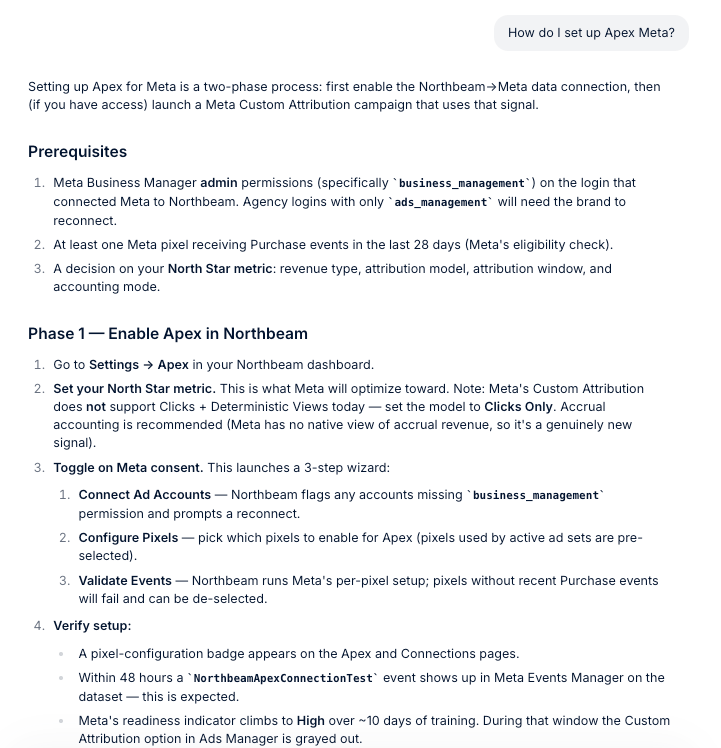
* `How do I set up Apex for Meta?`
* `Can you define each attribution model and explain when I should use each one?`
* `How do I troubleshoot a disconnected ad platform?`
* `Where do I change my default attribution model?`
## Ask a support or how-to question
Ask about setup, troubleshooting, concepts, or where to find something in the
product. Northbeam AI searches our documentation, walks you through the steps,
and links the articles it used.
For example:
* `How do I set up Apex for Meta?`
* `Can you define each attribution model and explain when I should use each one?`
* `How do I troubleshoot a disconnected ad platform?`
* `Where do I change my default attribution model?`
 ## Ask about your data
Northbeam AI can also query your account and answer directly in the conversation.
For example:
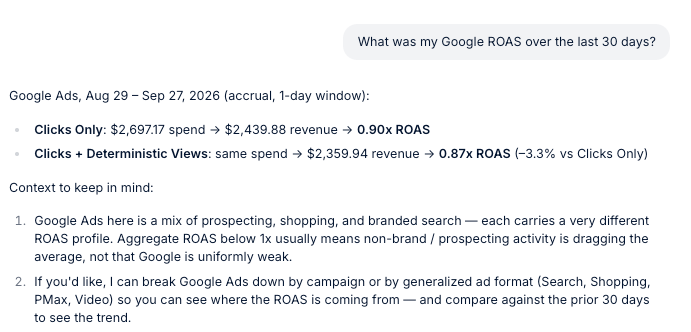
* `What was my Google ROAS over the last 30 days?`
* `Break down spend and revenue by platform for the last 30 days.`
* `Which campaigns dropped the most week over week?`
Northbeam AI queries the dashboard you are currently in. It reads your data — it
does not edit orders, spend, or your platform connections.
It can update **your own** default attribution settings if you ask, for example
`Set my default attribution model to Last Click` or `Switch me to cash accounting`.
That only affects your defaults, not anyone else's.
## Ask about your data
Northbeam AI can also query your account and answer directly in the conversation.
For example:
* `What was my Google ROAS over the last 30 days?`
* `Break down spend and revenue by platform for the last 30 days.`
* `Which campaigns dropped the most week over week?`
Northbeam AI queries the dashboard you are currently in. It reads your data — it
does not edit orders, spend, or your platform connections.
It can update **your own** default attribution settings if you ask, for example
`Set my default attribution model to Last Click` or `Switch me to cash accounting`.
That only affects your defaults, not anyone else's.
 ## File a support ticket
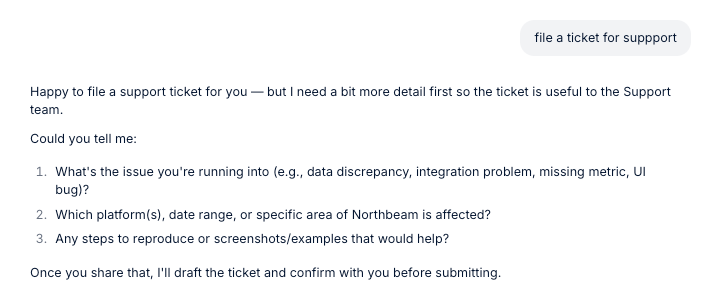
If you still need help, ask Northbeam AI to submit a support ticket. It will ask a
couple of follow-up questions first so our Support team has the right context, then
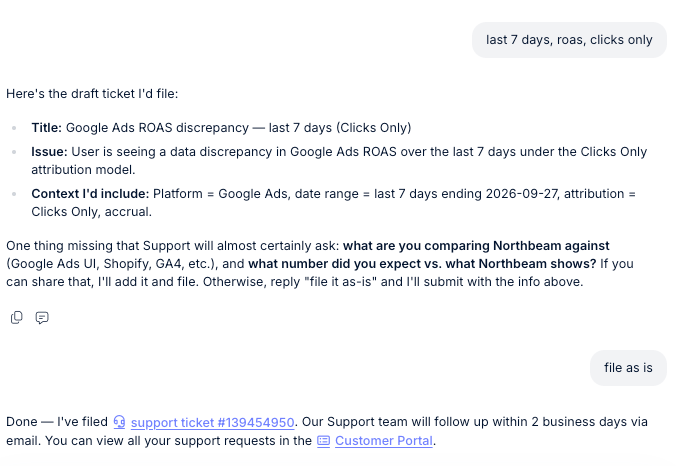
confirm with you before filing.
Once the ticket is filed you get the ticket number and a link to view it. You can
also open the **Customer Portal** to track all of your requests in one place.
## File a support ticket
If you still need help, ask Northbeam AI to submit a support ticket. It will ask a
couple of follow-up questions first so our Support team has the right context, then
confirm with you before filing.
Once the ticket is filed you get the ticket number and a link to view it. You can
also open the **Customer Portal** to track all of your requests in one place.
 ## Context Center
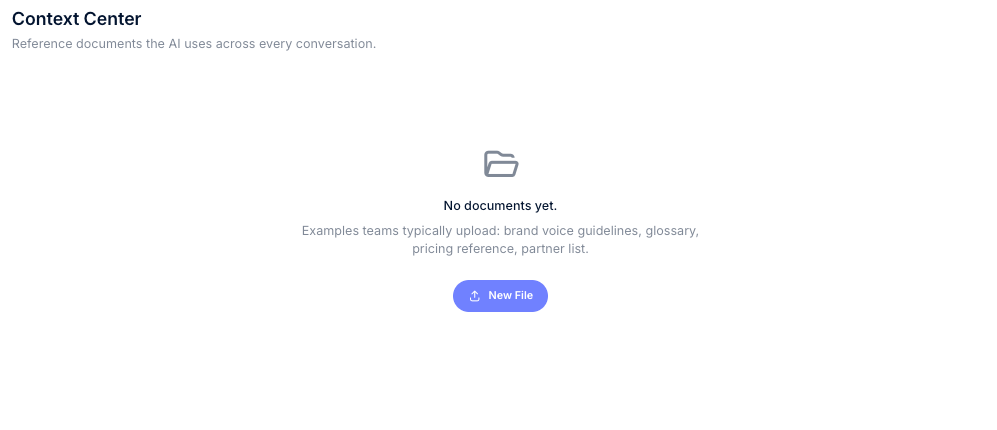
**Context Center** is a shared library of reference documents that Northbeam AI can
use across every conversation on your dashboard. It tells Northbeam AI *what to
know* about your business.
Open it from **Context Center** at the top of the conversation list.
Good things to upload:
* Brand guidelines and glossaries
* Pricing references and partner lists
* Budget plans and promotion calendars
* Internal operating procedures and media-buying playbooks
Add a document with **New File**. Give it a short description — Northbeam AI uses
the description to decide when the document is relevant, so it is worth writing a
real one. You can edit, download, or delete a document at any time, and search the
list by filename or description.
Uploads accept `.csv`, `.txt`, `.md`, `.json`, and `.yaml` files, up to 1 MB each,
with a limit of 100 documents per dashboard. Descriptions can be up to 500
characters.
Context Center is shared: every user on the dashboard sees the same files and
Northbeam AI uses them for everyone.
## Context Center
**Context Center** is a shared library of reference documents that Northbeam AI can
use across every conversation on your dashboard. It tells Northbeam AI *what to
know* about your business.
Open it from **Context Center** at the top of the conversation list.
Good things to upload:
* Brand guidelines and glossaries
* Pricing references and partner lists
* Budget plans and promotion calendars
* Internal operating procedures and media-buying playbooks
Add a document with **New File**. Give it a short description — Northbeam AI uses
the description to decide when the document is relevant, so it is worth writing a
real one. You can edit, download, or delete a document at any time, and search the
list by filename or description.
Uploads accept `.csv`, `.txt`, `.md`, `.json`, and `.yaml` files, up to 1 MB each,
with a limit of 100 documents per dashboard. Descriptions can be up to 500
characters.
Context Center is shared: every user on the dashboard sees the same files and
Northbeam AI uses them for everyone.
 ## Custom Instructions
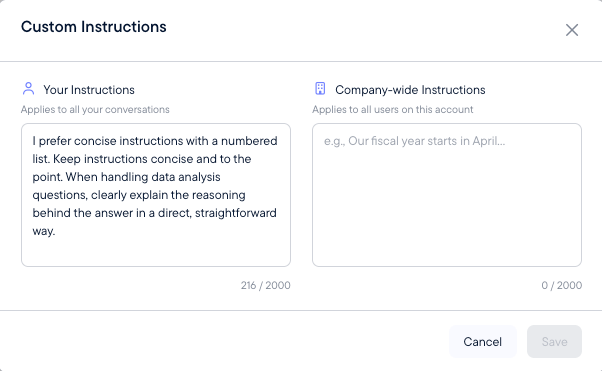
**Custom Instructions** are standing rules that guide how Northbeam AI answers and
analyzes. Where Context Center tells it *what to know*, Custom Instructions tell it
*how to behave*.
Open them from **Custom Instructions** at the bottom of the conversation list.
There are two boxes:
| | Applies to | Use it for |
| - | - | - |
| **Your Instructions** | Your conversations only, on every dashboard you have access to | Personal preferences — response length, level of detail, formatting |
| **Company-wide Instructions** | Everyone on this dashboard | Business rules — fiscal calendar, accounting conventions, attribution preferences, targets |
Examples:
* Your Instructions: `Keep answers concise and lead with the most important numbers.`
* Company-wide Instructions: `Our fiscal year starts in April. Use accrual accounting and compare performance against our contribution-margin target.`
Each box holds up to 2,000 characters.
Despite the name, **Company-wide Instructions apply to one dashboard, not to your
whole company.** If you have more than one Northbeam dashboard, add your
instructions — and your Context Center files — separately on each one.
## Custom Instructions
**Custom Instructions** are standing rules that guide how Northbeam AI answers and
analyzes. Where Context Center tells it *what to know*, Custom Instructions tell it
*how to behave*.
Open them from **Custom Instructions** at the bottom of the conversation list.
There are two boxes:
| | Applies to | Use it for |
| - | - | - |
| **Your Instructions** | Your conversations only, on every dashboard you have access to | Personal preferences — response length, level of detail, formatting |
| **Company-wide Instructions** | Everyone on this dashboard | Business rules — fiscal calendar, accounting conventions, attribution preferences, targets |
Examples:
* Your Instructions: `Keep answers concise and lead with the most important numbers.`
* Company-wide Instructions: `Our fiscal year starts in April. Use accrual accounting and compare performance against our contribution-margin target.`
Each box holds up to 2,000 characters.
Despite the name, **Company-wide Instructions apply to one dashboard, not to your
whole company.** If you have more than one Northbeam dashboard, add your
instructions — and your Context Center files — separately on each one.
 ## Does this replace Northbeam Support?
No. Northbeam AI makes it faster to get answers and to reach our team from inside
the product. When something needs a person, ask it to file a support ticket and our
Support team picks it up from there.
## Related
* [Connect Northbeam to your AI assistant](/docs/northbeam-mcp) — use Northbeam data from ChatGPT, Claude, or another tool via MCP
* [Northbeam MCP Server FAQs](/docs/northbeam-mcp-server-faqs) — security and privacy
## Does this replace Northbeam Support?
No. Northbeam AI makes it faster to get answers and to reach our team from inside
the product. When something needs a person, ask it to file a support ticket and our
Support team picks it up from there.
## Related
* [Connect Northbeam to your AI assistant](/docs/northbeam-mcp) — use Northbeam data from ChatGPT, Claude, or another tool via MCP
* [Northbeam MCP Server FAQs](/docs/northbeam-mcp-server-faqs) — security and privacy