> ## Documentation Index
> Fetch the complete documentation index at: https://docs.northbeam.io/llms.txt
> Use this file to discover all available pages before exploring further.
# Manage Breakdowns and Saved Views
**Breakdowns** are used to organize your channels, campaigns, adsets, and ads in any way you'd like. They are a handy tool that can be utilized across almost all pages in your dashboard.
In this guide, we'll cover:
* Northbeam's Default Breakdowns
* Making a Custom Breakdown
* Editing a Default Breakdown
## Northbeam's Default Breakdowns
We provide 4 default breakdowns, and many of our customers also choose to create custom breakdowns for specific groupings.
***
### **"Platform (Northbeam)"**
In this breakdown, Channels are grouped by their respective platforms. For example: Facebook Ads, Google Ads, TikTok Ads, Twitter, Organic, Organic Search, etc.
You’ll also see a group named “Other.” We categorize any miscellaneous traffic here, so it’s important to check this and regroup if necessary.
### How the "Platform (Northbeam)" Breakdown Works
The **Platform (Northbeam)** breakdown automatically sorts every visit, click, and conversion into a standardized set of channel names, such as Facebook Ads, Google Ads, TikTok Ads, and Organic Search, so you can compare performance across all of your marketing in one place.
This breakdown is maintained by Northbeam and applied automatically to every account.
#### How a Visit Is Classified
For each visit, Northbeam evaluates a prioritized list of platforms and assigns the **first matching platform**.
Because more specific platforms are evaluated before broader catch-all categories, well-tagged ad traffic is typically classified before falling through to categories such as Organic, Unattributed, or Other.
To classify a visit, Northbeam evaluates four primary signals:
| Signal | Description |
| - | - |
| **Northbeam Tracking (NBT)** | The platform identified by Northbeam's first-party tracking. This is typically the most reliable signal. |
| **Connected Ad Account** | The advertising platform associated with a connected ad account, such as Meta, Google, TikTok, or Pinterest. |
| **UTM Parameters** | Values contained in `utm_source`, `utm_medium`, and `utm_campaign`. |
| **Referring Site** | The website a visitor came from before arriving on your site. |
> **Note:** UTM matching is case-insensitive. "Equals" means the value must match exactly. "Contains" means the value may appear anywhere within the field.
#### Platform Definitions
| Platform | Matching Logic |
| - | - |
| **Facebook Ads** | Classified as Facebook Ads when the visit is not Meta Shops or Facebook Organic and Northbeam identifies Meta through:
• NBT platform = `fb` • `utm_source` or `utm_medium` equals `facebook`, `instagram`, `fb`, `ig`, `an`, or `msg` • `utm_source` contains `fb_ads` • `utm_source` or `utm_medium` contains a Meta placement value such as `Facebook_Mobile_Feed`, `Facebook_Desktop_Feed`, `Facebook_Instant_Articles`, `Facebook_Marketplace`, `Facebook_Right_Column`, `Facebook_Instream_Video`, `Facebook_Stories`, `Instagram_Feed`, `Instagram_Explore`, or `Instagram_Stories` • `utm_source` or `utm_medium` contains `facebook` or `instagram` while the other field contains a paid social value such as `paid`, `paid-social`, `paid_social`, or `p` |
| **Google Ads** | Classified as Google Ads when:
• NBT platform = `adwords` • `utm_source` or `utm_medium` equals `google`, `adwords`, or `youtube` |
| **YouTube Ads** | Classified as YouTube Ads when:
• Connected Google campaign channel type = `Video` • NBT platform = `adwords` and campaign name or `utm_source` contains `video`, `youtube`, or `yt` • `utm_source` equals `google`, `youtube`, or `yt` and `utm_medium = video` (or vice versa) |
| **YouTube Organic** | Classified as YouTube Organic when the referring site is `youtube.com`. |
| **TikTok Ads** | Classified as TikTok Ads when:
• Connected ad account = `tiktok` • `utm_source` contains `tiktok` • `utm_medium` contains `tiktok` • Campaign name contains `tiktok` • `utm_source = tiktok` and `utm_medium = cpc`
Appears as **TikTok** in reports. |
| **Pinterest** | Classified as Pinterest when:
• A connected Pinterest account exists • `utm_source`, `utm_medium`, or campaign name contains `pinterest` • Referring site contains `pinterest` |
| **Snapchat Ads** | Classified as Snapchat Ads when:
• Northbeam Tracking identifies LinkedIn • `utm_source = linkedin` • Referring site = `linkedin.com` |
| **Microsoft Ads (Bing)** | Classified as Microsoft Ads when:
• Northbeam Tracking identifies Microsoft • `utm_source` or `utm_medium` contains `bing` |
| **Reddit** | Classified as Reddit when:
• `utm_source` contains `reddit` • Referring site = `reddit.com` |
| **Twitter** | Classified as Twitter when:
• Referring site is `twitter.com` or `t.co` • `utm_source` contains `twitter` • Connected ad account is Twitter |
| **Klaviyo** | Classified as Klaviyo when:
• Northbeam Tracking identifies Klaviyo • Campaign name contains `klaviyo` • `utm_source` or `utm_medium` contains `klaviyo` |
| **SMS & Email Platforms** | Classified by the specific provider when its name or tagging conventions are detected, including:
• **Attentive** (`utm_source`, `utm_medium`, or campaign name = `attentive`) • **Postscript** (`postscript` in UTMs, or SMS tagging where one of `utm_source` / `utm_medium` is `ps` and the other is `sms`) • **SMSBump** (`smsbump` in UTMs, or `utm_medium = sms` and `utm_source = campaign`) • **Wunderkind**, **ActiveCampaign**, **LiveIntent**, **Recart**, **PushOwl**, and **Retention Science (ReSci)** when their names appear in UTMs or campaign names • **Other Email** when `utm_source` or `utm_medium` equals `email`, or the visit originated from an email application |
| **Affiliate Platforms** | Classified as an affiliate platform when Northbeam identifies affiliate-specific integrations or UTMs, including:
• **Impact** (`utm_source` begins with `impact`, or a connected Impact account) • **ShareASale** (`shareasale` appears in UTMs or referral domains) • **Rakuten** (connected Rakuten account, or `rakuten` in UTMs or campaign names) • **Awin** (`utm_source = aw` or `awin`, or `utm_medium = awin`) • **AvantLink** (`avantlink` appears in UTMs) • **Refersion** (NBT = `refersion` or Refersion UTMs) • **Pepperjam / Partnerize** (NBT = `pepperjam`, or UTMs contain `pepperjam` or `partnerize`) • **Friendbuy**, **Sezzle**, **Grin**, **Yotpo**, and **Loox** when their names appear in UTMs |
| **Native & Content Platforms** | Classified by platform-specific identifiers appearing in `utm_source`, `utm_medium`, or campaign names, including **Taboola**, **Outbrain**, **Revcontent**, and **SourceKnowledge**. |
| **CTV, Audio & Programmatic** | Classified primarily using connected ad accounts (or matching UTMs), including **The Trade Desk** (Display, Video, Audio, and CTV variants), **Bliss Point Media** (Display, Audio, and Linear variants), **Tatari**, **Tatari Linear**, **MNTN**, **Mediamath**, **Adelphic**, **Audacy**, **Vibe**, **Rokt**, **Criteo**, **Amazon DSP**, **Google DV 360**, and **Axon by AppLovin**. |
| **Influencer** | Classified as Influencer when campaign names or UTM parameters contain `influencer` or `partnership` and the visit does not match a supported advertising platform first. |
| **Amazon - Ads and Organic** | Classified as Amazon - Ads and Organic when attributed to a connected Amazon Marketplace integration. |
| **Meta Shops / TikTok Shops** | Classified as Meta Shops or TikTok Shops when orders are attributed to a connected Meta Shop or TikTok Shop storefront. Organic storefront orders are categorized separately as **Meta Shops (Organic)** or **TikTok Shops (Organic)**. |
| **Discount Site** | Classified as Discount Site when the referring site, `utm_source`, or campaign matches a known coupon or deal site such as Honey, RetailMeNot, Rakuten Ebates, Slickdeals, Knoji, and similar services. |
| **Transactional** | Classified as Transactional for visits originating from checkout or post-purchase services such as Afterpay, Klarna, Shop, PayPal, Narvar, and Returnly. |
| **Organic Search** | Classified as Organic Search when the referring site is a recognized search engine, including Google, Bing, Yahoo, DuckDuckGo, Yandex, and similar providers. |
| **Organic Social** | Visits from social referral domains without paid advertising signals. These appear as individual platform values, including **Facebook Organic**, **Instagram Organic**, **TikTok Organic**, and **YouTube Organic**, based on the referring site. |
| **Organic** | Classified as Organic for direct visits with no tracked source. |
| **Unattributed** | Activity Northbeam could not tie to a specific source. |
| **Other** | Anything that does not match a known platform definition. |
> **Note:** Platform definitions are maintained by Northbeam and updated over time as new advertising platforms, integrations, and tagging conventions emerge.
***
### "**Category (Northbeam)" **
Channels are grouped by a higher-level category. For example, Paid Prospecting, Paid Performance Max, Paid branded Search, SMS, Affiliate, etc.
We normally don’t edit the groups of this breakdown since our view-through model uses these pre-set categorizations for the weighting in our Clicks + Modeled Views model.
***
### "**Targeting (Northbeam)"**
Channels are grouped by their targeting. For example, Paid Branded Search, Paid Shopping, Paid Display, Paid NonBrand Search.
***
### "**Revenue Source (Northbeam)"**
Channels are grouped by their source. This breakdown only has two groups:
* **Online Store** - orders from your Shopify Connection or Server API Connection
* **Amazon - Ads and Organic** - orders from your Amazon Integration (if relevant)
***
Want to see the segments of our Default Breakdowns?
At the bottom of this page, see the segments for each of our default breakdowns. Our system categorizes your campaigns based on predefined rules.
## Making a Custom Breakdown
You may have a specific breakdown in mind that doesn't align with our defaults. You can easily create custom breakdowns using our **Breakdown Manager**.
Learn how to use our Breakdown Manager below. Find timestamps within the video as well.
### What the video covers
The video above walks through:
* Creating breakdowns from scratch
* Using campaign names, UTM parameters, platforms, and custom spend sheet values as breakdown logic
* The difference between the Simple Editor and Advanced Editor
* Previewing matched campaigns before saving rules
* Creating manual label overrides
* Duplicating and customizing Northbeam's default breakdowns
* Common breakdown use cases such as funnel stages, regions, products, and high-level marketing buckets
***
## Editing a Default Breakdown
Want to make a slight tweak to a default breakdown? No problem. Instead of creating a new breakdown, here's how to edit an existing one.
### Step 1: Open [Breakdowns](https://dashboard.northbeam.io/breakdowns)
1. In the upper right corner, click **☰**
2. Click **Manage Breakdowns**
You'll be taken to the tab called **Manage Breakdowns**. This is where you can see and manage all of the breakdowns in your account. What you have to do is create a new breakdown and **name it the exact same name** as the default breakdown you want to edit — more on that in Step 2.
As a reminder, here are our default breakdown names:
* **Platform (Northbeam)**
* **Targeting (Northbeam)**
* **Revenue Source (Northbeam)**
* **Category (Northbeam)** - **NOTE: Please do not edit this breakdown**. Our MTA models (Clicks-Only and Clicks + Modeled Views) uses its breakdown assignments to determine how much weight specific channels receive. Editing could result in data inaccuracies.
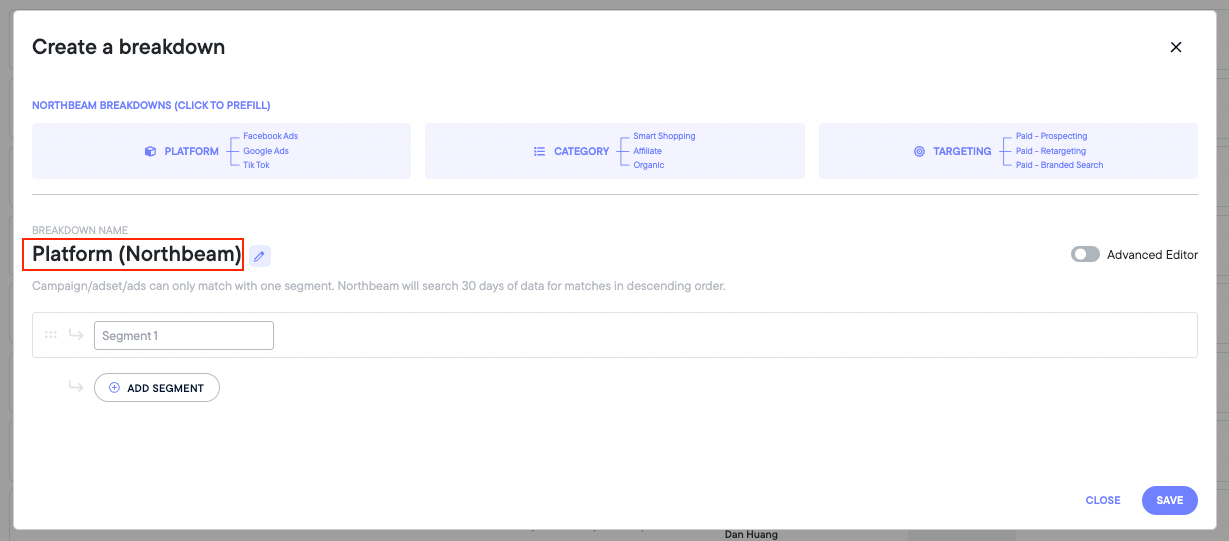
### Step 2: Click Add Breakdown and name it the same as the default breakdown you'd like to edit.
**For example**, to edit our default Platform breakdown, name your new one **Platform (Northbeam)**.
### Step 3: From here, any edits made will reflect in the default platform breakdown.
## Default Breakdown Segments
### Segments for Platform (Northbeam)
Below is a list of our most commonly-used segments:
* Facebook Ads
* Google Ads
* YouTube Ads
* TikTok Ads
* Pinterest Ads
* Snapchat Ads
* Twitter Ads
* Amazon Ads and Organic
* Organic
* Organic Search
* Facebook Organic
* Klaviyo
* Unattributed
* Excluded
* Other
### Segments for Category (Northbeam)
Below is a list of our most commonly-used segments:
* Paid - Prospecting
* Paid - Performance Max
* Paid - Nonbranded Search
* Paid - Other
* Paid - Branded Search
* Paid - Awareness
* Organic
* Organic Search
* Email
* Unattributed
* Other
* Organic Social
* Affiliate
### Segments for Targeting (Northbeam)
Below is a list of our most commonly-used segments:
* Paid - Prospecting
* Paid - Nonbranded Search
* Paid - Branded Search
* Paid - Smart Shopping
* Paid - Other
* Paid - Video
* Paid - Retargeting
* Paid - Display
Important: Renaming an existing breakdown is treated as creating a completely new breakdown internally.
Renaming or deleting breakdowns that are already being used in saved views, dashboards, MMM models, or other reporting workflows can cause:
* Saved view errors
* Missing or broken dashboard tiles
* MMM/model segmentation issues
* Previously configured reports to stop working correctly
We strongly recommend avoiding renaming or deleting actively-used breakdowns unless absolutely necessary. If you need to make major changes, consider creating a new breakdown instead.
If you're unsure whether a breakdown is being used elsewhere in your account, please contact Support before making changes.
Please reach out to your Media Strategist, Customer Success Manager, or contact [Support](https://www.northbeam.io/submit-a-support-ticket) if you have any questions.
 ### Step 3: From here, any edits made will reflect in the default platform breakdown.
## Default Breakdown Segments
### Segments for Platform (Northbeam)
Below is a list of our most commonly-used segments:
* Facebook Ads
* Google Ads
* YouTube Ads
* TikTok Ads
* Pinterest Ads
* Snapchat Ads
* Twitter Ads
* Amazon Ads and Organic
* Organic
* Organic Search
* Facebook Organic
* Klaviyo
* Unattributed
* Excluded
* Other
### Segments for Category (Northbeam)
Below is a list of our most commonly-used segments:
* Paid - Prospecting
* Paid - Performance Max
* Paid - Nonbranded Search
* Paid - Other
* Paid - Branded Search
* Paid - Awareness
* Organic
* Organic Search
* Email
* Unattributed
* Other
* Organic Social
* Affiliate
### Segments for Targeting (Northbeam)
Below is a list of our most commonly-used segments:
* Paid - Prospecting
* Paid - Nonbranded Search
* Paid - Branded Search
* Paid - Smart Shopping
* Paid - Other
* Paid - Video
* Paid - Retargeting
* Paid - Display
### Step 3: From here, any edits made will reflect in the default platform breakdown.
## Default Breakdown Segments
### Segments for Platform (Northbeam)
Below is a list of our most commonly-used segments:
* Facebook Ads
* Google Ads
* YouTube Ads
* TikTok Ads
* Pinterest Ads
* Snapchat Ads
* Twitter Ads
* Amazon Ads and Organic
* Organic
* Organic Search
* Facebook Organic
* Klaviyo
* Unattributed
* Excluded
* Other
### Segments for Category (Northbeam)
Below is a list of our most commonly-used segments:
* Paid - Prospecting
* Paid - Performance Max
* Paid - Nonbranded Search
* Paid - Other
* Paid - Branded Search
* Paid - Awareness
* Organic
* Organic Search
* Email
* Unattributed
* Other
* Organic Social
* Affiliate
### Segments for Targeting (Northbeam)
Below is a list of our most commonly-used segments:
* Paid - Prospecting
* Paid - Nonbranded Search
* Paid - Branded Search
* Paid - Smart Shopping
* Paid - Other
* Paid - Video
* Paid - Retargeting
* Paid - Display