> ## Documentation Index
> Fetch the complete documentation index at: https://docs.northbeam.io/llms.txt
> Use this file to discover all available pages before exploring further.
# Lookback Windows
> Northbeam now allows you to **set a lookback window** for how far back we consider touchpoints when attributing orders.
## What’s a Lookback Window?
A lookback window defines how far back in time we consider touchpoints (like ad clicks or views) when attributing an order.
For example:
* With an **infinite lookback**, a Facebook ad click from two years ago could still receive credit for a purchase made today.
* With a **90-day lookback**, only touchpoints that occurred within the 90 days before the order are eligible for credit.
By setting a lookback window, you keep journeys realistic and prevent credit from being assigned to interactions that happened too far in the past.
***
## How This Differs From Attribution Windows
It’s easy to confuse lookback windows with attribution windows, but they serve different purposes:
* **Lookback Windows**: Decide *which touchpoints are eligible* to receive credit for an order.
* Example: With a 90-day lookback, a click from 6 months ago is ignored completely — no credit is ever assigned to it, even if it’s the only touchpoint.
* **Attribution Windows**: Act as a *filter on the revenue that’s already been distributed to touchpoints*. Once an order’s value is split across eligible touchpoints (based on the lookback window), the attribution window answers: *“How much of this order’s revenue came from touchpoints within X days of the order?”*
* Example: With a 7-day attribution window, we can say: *"Of this \$300 order, \$225 came from touchpoints in the past 7 days, and \$75 came from older touchpoints."*
In other words:
* **Lookback Window = eligibility** (who can ever get credit).
* **Attribution Window = reporting lens** (of the credit assigned, how much is recent vs. older).
### Learn more about Attribution Windows here: [Attribution Windows Documentation](/docs/attribution-windows)
***
## Why This Matters
Without a lookback window, long-tenured customers can end up with journeys that stretch back years. This can cause:
1. **Unrealistic credit allocation** — credit gets sent to ads long in the past.
2. **Distorted returning customer revenue** — revenue may appear lower in recent periods because it’s being attributed far back in time.
3. **Inflated touchpoint counts** — journeys can include years of activity, making them hard to interpret.
When a lookback window is applied, we typically see the **largest impact on returning customer revenue**, since returning customers are more likely to have older touchpoints. New customer revenue is usually much less affected.
***
## How to Change Your Lookback Window
1. Go to **Settings → Model Settings**.
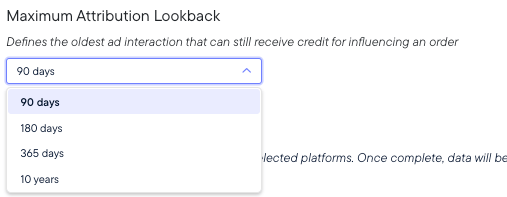
2. Select your preferred lookback window (90 days, 180 days, 1 year, or 10 years). The default is 180 days.
3. Once updated, your data will automatically restate within 24 hours.
 ***
## Important Note on Historical Data
Changing your lookback window does more than affect data going forward — it **retroactively restates historical data across your entire Northbeam account**.
This has two important implications:
1. **Historical numbers will update** - When you adjust the lookback window, your past reporting will also shift. This means teammates might notice unexpected changes in dashboards and reports.
2. **You can undo changes** - If you switch your lookback window and later decide to revert, simply reset it to the previous setting. Your historical data will return to its prior state — no harm done.
***
## Key Takeaways
* Lookback windows **set the bounds** on how far back we consider touchpoints for attribution.
* This prevents unrealistic journeys (e.g., giving credit to a two-year-old ad).
* Returning customer revenue is typically most affected — but new customer revenue can shift too.
* Choose the lookback that still reflects your sales cycle.
* **Remember:** changing the lookback window updates historical numbers account-wide, but you can always revert to your prior setting.
***
## Important Note on Historical Data
Changing your lookback window does more than affect data going forward — it **retroactively restates historical data across your entire Northbeam account**.
This has two important implications:
1. **Historical numbers will update** - When you adjust the lookback window, your past reporting will also shift. This means teammates might notice unexpected changes in dashboards and reports.
2. **You can undo changes** - If you switch your lookback window and later decide to revert, simply reset it to the previous setting. Your historical data will return to its prior state — no harm done.
***
## Key Takeaways
* Lookback windows **set the bounds** on how far back we consider touchpoints for attribution.
* This prevents unrealistic journeys (e.g., giving credit to a two-year-old ad).
* Returning customer revenue is typically most affected — but new customer revenue can shift too.
* Choose the lookback that still reflects your sales cycle.
* **Remember:** changing the lookback window updates historical numbers account-wide, but you can always revert to your prior setting.