> ## Documentation Index
> Fetch the complete documentation index at: https://docs.northbeam.io/llms.txt
> Use this file to discover all available pages before exploring further.
# Troubleshooting Pixel Tracking
***
## **Introduction**
Accurate order attribution relies on two key data sources:
1. **Server Data** – Pulled via the Orders API or Shopify integration.
2. **Pixel Data** – Captured via Northbeam's tracking scripts (Northbeam Pixel + Purchase Pixel).
Your goal should be to ensure that **85%+ of all orders are pixel tracked**. A 15% buffer is allowed due to ad blockers, VPNs, and other tracking restrictions.
This tool helps identify missing **server data** or **pixel data** for any given order and provides steps to troubleshoot issues.
***
## **Step 1: Check Pixel Tracked Percentages**
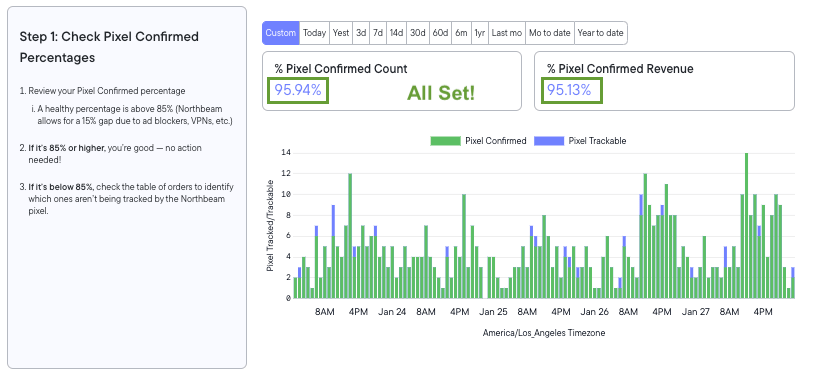
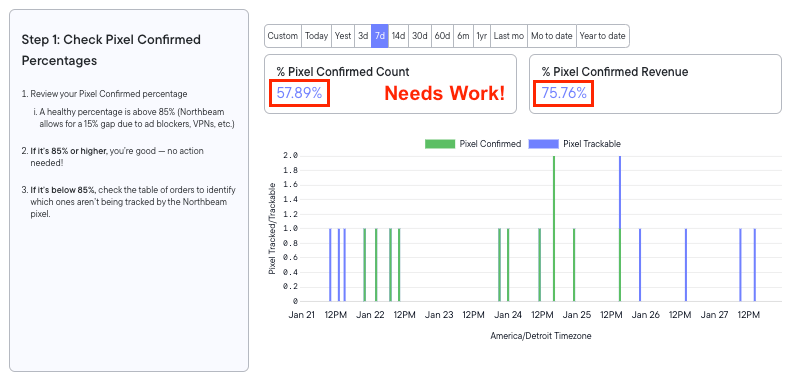
1. Review the **% Pixel Confirmed Count** at the top of the dashboard.
2. A healthy percentage is **above 85%**.
* **85% or higher** → No action needed!
* **Below 85%** → Investigate missing tracking data in the order table (Step 2).
3. Use the graph to identify trends over time.
### Examples below
 ***
## **Step 2: Check Order Tracking Status**
### **How to Identify Issues:**
* **Use the UI**: Work directly in the tool to filter and analyze data.
* **Export Data via CSV**: Easier to review larger datasets.
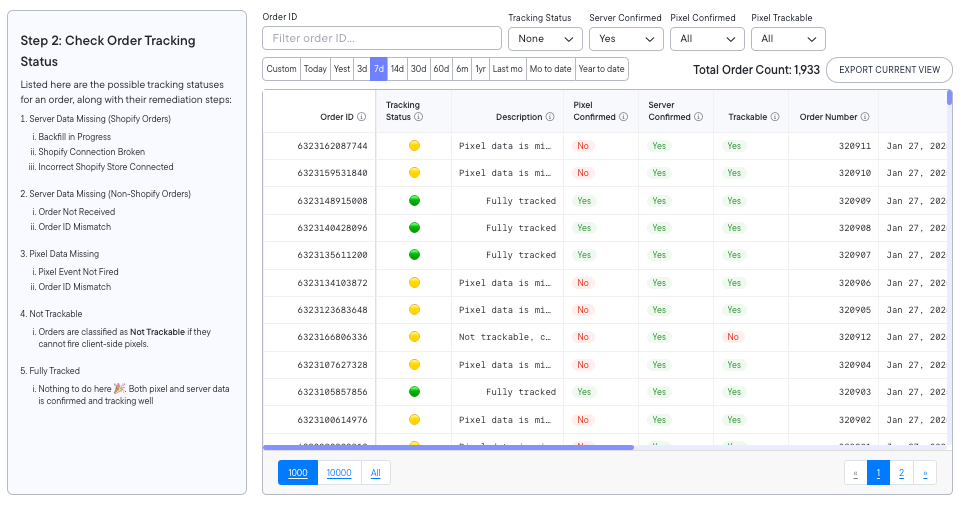
* **Pay attention to the color-coded tracking statuses:**
* 🔴 **Red**: Server data missing (requires immediate attention).
* 🟡 **Yellow**: Pixel data missing (may indicate tracking issues).
* 🟢 **Green**: Fully tracked (no action needed).\
***
## **Step 2: Check Order Tracking Status**
### **How to Identify Issues:**
* **Use the UI**: Work directly in the tool to filter and analyze data.
* **Export Data via CSV**: Easier to review larger datasets.
* **Pay attention to the color-coded tracking statuses:**
* 🔴 **Red**: Server data missing (requires immediate attention).
* 🟡 **Yellow**: Pixel data missing (may indicate tracking issues).
* 🟢 **Green**: Fully tracked (no action needed).\
### Understanding Tracking Indicators
* **Pixel Confirmed:** Indicates if our pixel fired when this order was placed.
* **Server Confirmed:** Indicates if we received the order via the Orders API or Shopify Integration.
* **Trackable:** Indicates if this order should receive client-side tracking. Some order types, such as Offline Orders, Draft Orders, and Recurring Subscriptions, do not support client-side tracking by design.
 ### **Troubleshooting Tracking Statuses:**
#### 🔴 **Server Data Missing (Shopify Orders)**
* **Reason 1: Backfill in Progress**
* If you recently connected Shopify to Northbeam, order data may still be backfilling.
* **Action**: Wait a few days for backfill completion.
* **Reason 2: Shopify Connection Broken**
* The Shopify integration may not be properly set up.
* **Action**: Recheck the Shopify connection under **Step 8 - Add Orders** in the onboarding flow.
* **Reason 3: Incorrect Shopify Store Connected**
* The wrong Shopify store might be linked.
* **Action**: Verify that the correct Shopify store is connected.
#### 🔴 **Server Data Missing (Non-Shopify Orders)**
* **Reason 1: Order Not Received**
* The backend order has not yet synced with Northbeam.
* **Action**: Check to confirm that there are no orders API errors in step 8. If no errors wait for processing to complete and check again later.
* **Reason 2: Order ID Mismatch**
* The order IDs from the purchase pixel and the Orders API don’t match.
* **Action**: Verify that the purchase pixel order ID matches the API order ID.
* **Action**: Check the Orders API Validation Table for recent errors.
#### 🟡 **Pixel Data Missing**
* **Reason 1: Pixel Event Not Fired**
* The client-side order event didn’t reach Northbeam.
* **Action:** First, check Step 7 - Pixel Diagnostics to confirm there are no purchase event errors. If no errors are found, review the "Successful Purchase Events" volume for a given day and compare it to your internal order volume.
* **Reason 2: Order ID Mismatch**
* The client-side pixel order ID and the API order ID don’t match.
* **Action**: Ensure IDs align across both tracking sources.
#### 🟡 **Not Trackable**
* **Definition**: Orders that **cannot** fire client-side pixels.
* **Common Cases:**
* Recurring subscriptions
* Draft orders
* Offline/POS orders
* Wholesale orders
* Mobile app or Shop app purchases
* Exchanges/cancellations
* **Action:**
* **Check for Order Tags:** Verify if the order falls into one of the specified cases. If it does, ensure that there are appropriate order tags assigned to identify the order type in your orders data.
* **Add Missing Tags:** If no order tags exist for the relevant cases, update your orders data to include the necessary tags.
#### 🟢 **Fully Tracked**
* **Definition**: Both **server and pixel data** are confirmed.
* **Action**: No action required—you're all set!
***
## **Final Thoughts**
Using this tool correctly ensures accurate attribution and maximizes tracked orders.
* **If your Pixel Confirmed percentage is below 85%,** investigate missing tracking data using the order table.
* **Use color-coded statuses** to quickly diagnose and resolve issues.
* **Export CSV data** for deeper analysis when needed.
By following these steps, you can improve tracking accuracy and optimize your marketing attribution efforts.
If you need further assistance, reach out to [Support](https://www.northbeam.io/submit-a-support-ticket)!
### **Troubleshooting Tracking Statuses:**
#### 🔴 **Server Data Missing (Shopify Orders)**
* **Reason 1: Backfill in Progress**
* If you recently connected Shopify to Northbeam, order data may still be backfilling.
* **Action**: Wait a few days for backfill completion.
* **Reason 2: Shopify Connection Broken**
* The Shopify integration may not be properly set up.
* **Action**: Recheck the Shopify connection under **Step 8 - Add Orders** in the onboarding flow.
* **Reason 3: Incorrect Shopify Store Connected**
* The wrong Shopify store might be linked.
* **Action**: Verify that the correct Shopify store is connected.
#### 🔴 **Server Data Missing (Non-Shopify Orders)**
* **Reason 1: Order Not Received**
* The backend order has not yet synced with Northbeam.
* **Action**: Check to confirm that there are no orders API errors in step 8. If no errors wait for processing to complete and check again later.
* **Reason 2: Order ID Mismatch**
* The order IDs from the purchase pixel and the Orders API don’t match.
* **Action**: Verify that the purchase pixel order ID matches the API order ID.
* **Action**: Check the Orders API Validation Table for recent errors.
#### 🟡 **Pixel Data Missing**
* **Reason 1: Pixel Event Not Fired**
* The client-side order event didn’t reach Northbeam.
* **Action:** First, check Step 7 - Pixel Diagnostics to confirm there are no purchase event errors. If no errors are found, review the "Successful Purchase Events" volume for a given day and compare it to your internal order volume.
* **Reason 2: Order ID Mismatch**
* The client-side pixel order ID and the API order ID don’t match.
* **Action**: Ensure IDs align across both tracking sources.
#### 🟡 **Not Trackable**
* **Definition**: Orders that **cannot** fire client-side pixels.
* **Common Cases:**
* Recurring subscriptions
* Draft orders
* Offline/POS orders
* Wholesale orders
* Mobile app or Shop app purchases
* Exchanges/cancellations
* **Action:**
* **Check for Order Tags:** Verify if the order falls into one of the specified cases. If it does, ensure that there are appropriate order tags assigned to identify the order type in your orders data.
* **Add Missing Tags:** If no order tags exist for the relevant cases, update your orders data to include the necessary tags.
#### 🟢 **Fully Tracked**
* **Definition**: Both **server and pixel data** are confirmed.
* **Action**: No action required—you're all set!
***
## **Final Thoughts**
Using this tool correctly ensures accurate attribution and maximizes tracked orders.
* **If your Pixel Confirmed percentage is below 85%,** investigate missing tracking data using the order table.
* **Use color-coded statuses** to quickly diagnose and resolve issues.
* **Export CSV data** for deeper analysis when needed.
By following these steps, you can improve tracking accuracy and optimize your marketing attribution efforts.
If you need further assistance, reach out to [Support](https://www.northbeam.io/submit-a-support-ticket)!